cancel
Showing results for 
Search instead for 
Did you mean: 

Vote for your favorite vizzies from the Power BI Dataviz World Championship submissions. Vote now!

Reply
cristianml
Post Prodigy
Post Prodigy

RLS - Multiple Filters using USERPRINCIPALNAME

Hi,


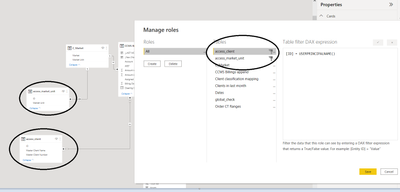
I need to use 2 RLS  to filter different categories based on ID .


When I use one categoy it works fine, in this case Access_Market_Unit.   But when I add another USERPRINCIPALNAME in (Access_ client)  It doesn´t work. after I publish this it shows no data cause of this second RLS.


cristianml_0-1656598486588.png


How can I solve this ?


Thanks.

1 ACCEPTED SOLUTION
Smalfly
Responsive Resident
Responsive Resident

Hi,


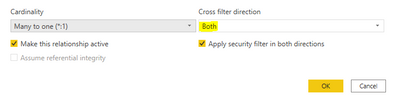
to be able to use RLS, you need a relationship between 'Access_client' and 'CCMS billings append' that works in both directions:


Smalfly_0-1656600973494.png

Once you have set the filter direction to 'Both', make sure to tick the "Apply security filter in both directions" checkbox.

View solution in original post

1 REPLY 1
Smalfly
Responsive Resident
Responsive Resident

Hi,


to be able to use RLS, you need a relationship between 'Access_client' and 'CCMS billings append' that works in both directions:


Smalfly_0-1656600973494.png

Once you have set the filter direction to 'Both', make sure to tick the "Apply security filter in both directions" checkbox.

Helpful resources

Announcements
Power BI DataViz World Championships

Power BI Dataviz World Championships

Vote for your favorite vizzies from the Power BI World Championship submissions!

Sticker Challenge 2026 Carousel

Join our Community Sticker Challenge 2026

If you love stickers, then you will definitely want to check out our Community Sticker Challenge!

January Power BI Update Carousel

Power BI Monthly Update - January 2026

Check out the January 2026 Power BI update to learn about new features.

FabCon Atlanta 2026 carousel

FabCon Atlanta 2026

Join us at FabCon Atlanta, March 16-20, for the ultimate Fabric, Power BI, AI and SQL community-led event. Save $200 with code FABCOMM.