This is best Fabric, Power BI, SQL and AI community event. How do we know? The last event sold out! Save €200 with code FABCMTY200.
Register nowA new Data Days event is coming soon! This time we’re going bigger than ever. Fabric, Power BI, SQL, AI and more. Don't miss out.
Hi Guys,
I need help with RLS.
I have multiple tables in my project and I have one user table and i want if a user logs in then he should only see the data based on his role. can someone help me with this?
Should i use the filter like username = username ()
What expression can I write for ID.
Regards,
Himanshu
Solved! Go to Solution.
Hi, @Anonymous
Userprincipalname() refers to the email adress that the user is currently using. This means that the ID column must contain the user email for this to work. Furthermore, the users table needs to be connected by relationship to the tables that needs to be filtered.
[ID] = userprincipalname()
You can try out the RLS roles in Power BI Service to simulate how the report looks when viewing as different users.
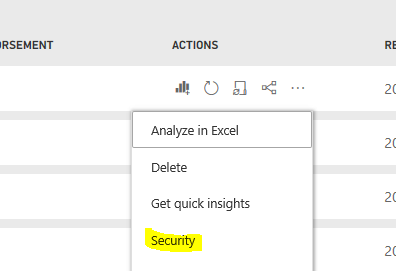
You can find this functionality under "Security" in the dataset options of the published dataset.
Br,
J
Hi, @Anonymous
Userprincipalname() refers to the email adress that the user is currently using. This means that the ID column must contain the user email for this to work. Furthermore, the users table needs to be connected by relationship to the tables that needs to be filtered.
[ID] = userprincipalname()
You can try out the RLS roles in Power BI Service to simulate how the report looks when viewing as different users.
You can find this functionality under "Security" in the dataset options of the published dataset.
Br,
J
@Anonymous , Not very clear.
Refer if this can help
RLS - Row Level security
https://community.powerbi.com/t5/MBAS-Gallery/Microsoft-Power-BI-Unleash-row-level-security-patterns...
https://radacad.com/dynamic-row-level-security-with-organizational-hierarchy-power-bi
https://www.blue-granite.com/blog/using-dynamic-row-level-security-with-organizational-hierarchies
Check out the May 2026 Power BI update to learn about new features.
Sign up to receive a private message when registration opens and key events begin.
If you have recently started exploring Fabric, we'd love to hear how it's going. Your feedback can help with product improvements.
| User | Count |
|---|---|
| 26 | |
| 25 | |
| 24 | |
| 21 | |
| 14 |
| User | Count |
|---|---|
| 56 | |
| 50 | |
| 26 | |
| 19 | |
| 18 |