
cancel
Showing results for 
Search instead for 
Did you mean: 

Learn from the best! Meet the four finalists headed to the FINALS of the Power BI Dataviz World Championships! Register now

Reply
Leonid_Kostin
Advocate I
Advocate I

RELATED function doesn't work

Hello, Power BI experts.


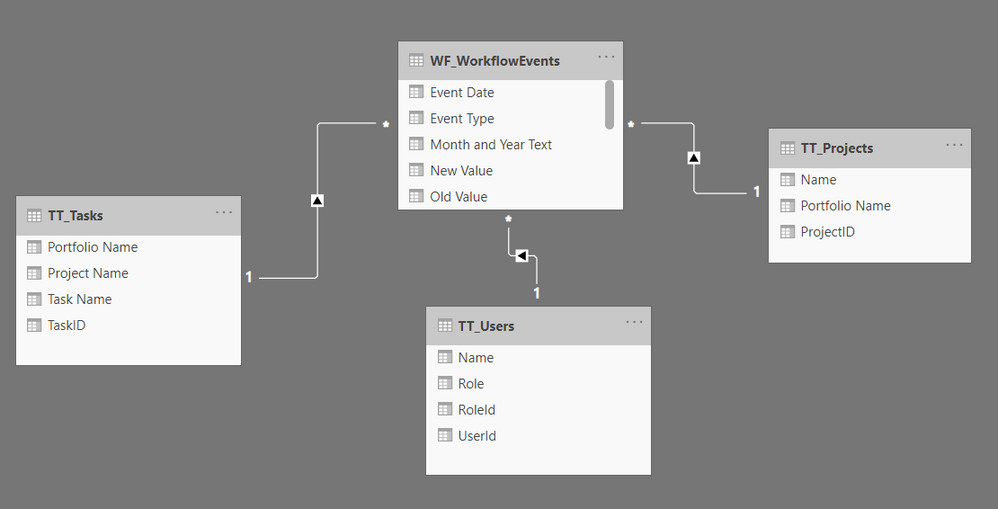
I've found myself in the strange position. After the July 2020 update some of my Direct Query report have broken visuals. The strange thing that I haven't changed anything, just opened them and found that all calculated columns with "RELATED" function are broken. How can it be? Did someone face this? All my RELATED functions are on the "many" side of "one-to-many" relationship. Don't understand what's going on. 


Thank you for your help and advice.broken visuals.png


3 REPLIES 3
amitchandak
Super User
Super User

@Leonid_Kostin , Can you share the formula used. Will try to test on a similar scenario.


Check if there are known issues - https://community.powerbi.com/t5/Issues/idb-p/Issues

Share with Power BI Enthusiasts: Full Power BI Video (20 Hours) YouTube
Microsoft Fabric Series 60+ Videos YouTube
Microsoft Fabric Hindi End to End YouTube

Hi again, @amitchandak !


I've found one interesting thing...So I checked 2 cases:


1. When I use my own created SQL statement to create a dataset (native query)

2. When I select the table from "New Source -> SQL Server -> ... " and then make some operations like filtering and ect.


In the first case I have an error during creation of the column using RELATED() function.

In the second case I don't have any issues.


So the method of loading data is important 🙂modelmodelno errorno errorerrorerror 

Hi, @amitchandak .


Thank you for your reply!


The formula is: 

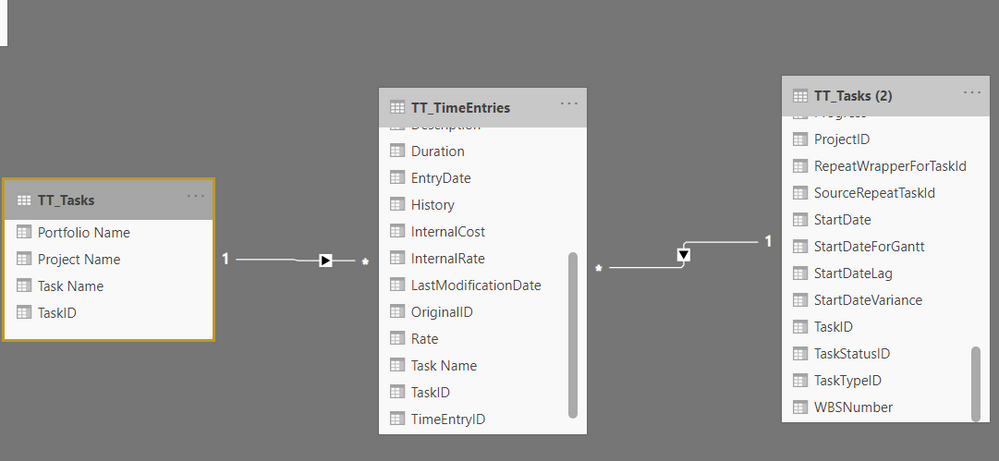
Task Name = RELATED(TT_Tasks[Task Name])
 
Basically I try to grab a task name from the TT_Tasks to the dataset on the "many" side.
 
model.png
 
Same for Portfolio Name and User Name.
 
Pretty simple case but still don't understand why after the July update it doesn't work.
 
Thank you!

Helpful resources

Announcements
New to Fabric survey Carousel

New to Fabric Survey

If you have recently started exploring Fabric, we'd love to hear how it's going. Your feedback can help with product improvements.

Power BI DataViz World Championships carousel

Power BI DataViz World Championships - June 2026

A new Power BI DataViz World Championship is coming this June! Don't miss out on submitting your entry.

Join our Fabric User Panel

Join our Fabric User Panel

Share feedback directly with Fabric product managers, participate in targeted research studies and influence the Fabric roadmap.

March Power BI Update Carousel

Power BI Community Update - March 2026

Check out the March 2026 Power BI update to learn about new features.