FabCon is coming to Atlanta
Join us at FabCon Atlanta from March 16 - 20, 2026, for the ultimate Fabric, Power BI, AI and SQL community-led event. Save $200 with code FABCOMM.
Register now!- Power BI forums
- Get Help with Power BI
- Desktop
- Service
- Report Server
- Power Query
- Mobile Apps
- Developer
- DAX Commands and Tips
- Custom Visuals Development Discussion
- Health and Life Sciences
- Power BI Spanish forums
- Translated Spanish Desktop
- Training and Consulting
- Instructor Led Training
- Dashboard in a Day for Women, by Women
- Galleries
- Data Stories Gallery
- Themes Gallery
- Contests Gallery
- QuickViz Gallery
- Quick Measures Gallery
- Visual Calculations Gallery
- Notebook Gallery
- Translytical Task Flow Gallery
- TMDL Gallery
- R Script Showcase
- Webinars and Video Gallery
- Ideas
- Custom Visuals Ideas (read-only)
- Issues
- Issues
- Events
- Upcoming Events
The Power BI Data Visualization World Championships is back! Get ahead of the game and start preparing now! Learn more
- Power BI forums
- Forums
- Get Help with Power BI
- Desktop
- Re: RE: current selections
- Subscribe to RSS Feed
- Mark Topic as New
- Mark Topic as Read
- Float this Topic for Current User
- Bookmark
- Subscribe
- Printer Friendly Page

- Mark as New
- Bookmark
- Subscribe
- Mute
- Subscribe to RSS Feed
- Permalink
- Report Inappropriate Content
RE: current selections
Hi All,
is there anyway to see all current selections done by user?
for example i have year filed ,month,product,......
in each filed i have selected some values.
how user know these are the values i selected from different fields? is there any object?
Best
Chanty
Solved! Go to Solution.


- Mark as New
- Bookmark
- Subscribe
- Mute
- Subscribe to RSS Feed
- Permalink
- Report Inappropriate Content
@Anonymous
I think it will be easier if you create 7 different measures instead of putting all the code directly in one.
Once you've done that you can put each of them in a card visual or, if you prefer, you can create another measure that aggregates all the others:
TotalMeasure = [ShowSlicerContents1] & UNICHAR(10) &
               [ShowSlicerContents2] & UNICHAR(10) &
                //Continue here with the other measures...
                [ShowSlicerContents7]
The UNICHAR(10) is for a new line
- Mark as New
- Bookmark
- Subscribe
- Mute
- Subscribe to RSS Feed
- Permalink
- Report Inappropriate Content
Hi @Anonymous
Where are you selecting the values, in slicers? The user can see the selection there. Otherwise you could create a measure that shows the selection on each slicer. Check this post out. Something similar was solved on it.
- Mark as New
- Bookmark
- Subscribe
- Mute
- Subscribe to RSS Feed
- Permalink
- Report Inappropriate Content
thanks @AlB
but i m unable modify the measure 😞 as im pretty new for coding 😞
i have slicers Quarter,Month,Region,...like 7 slicers how to add these 7 scliers into this code?
ShowSlicerContents =
IF (
    ISFILTERED ( Table1[Column In Slicer] );
    "Filter aplied. Values:" & UNICHAR ( 10 )
        & CONCATENATEX ( DISTINCT ( Table1[Column In Slicer] ); Table1[Column In Slicer]; ", " );
    "No filter applied"
)
tried but im geeting error you can see in Image
best
chanty
- Mark as New
- Bookmark
- Subscribe
- Mute
- Subscribe to RSS Feed
- Permalink
- Report Inappropriate Content
@Anonymous
That measure is just to show the selections in one slicer. It could be modified to include more or, probably best, you could have one such measure per slicer. 7 in your case.
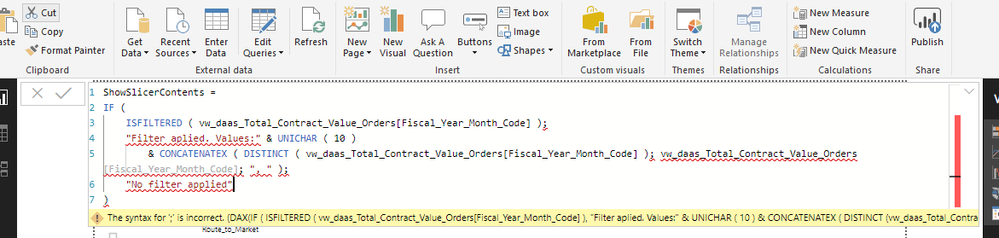
In any case the problem that you seem to have now is that you need to change the ";" separator in the original code for comma "," as you seem to have different locale settings.
- Mark as New
- Bookmark
- Subscribe
- Mute
- Subscribe to RSS Feed
- Permalink
- Report Inappropriate Content
for one slicer also still im getting error 😞
where im missing?
- Mark as New
- Bookmark
- Subscribe
- Mute
- Subscribe to RSS Feed
- Permalink
- Report Inappropriate Content
@Anonymous
Like I just said, you need to use commas instead of semicolons in the code:
ShowMeasure =
IF (
    ISFILTERED ( vw_daas_Total_Contract_Value_Orders[Fiscal_Year_Month_Code] ),
    "Filter aplied. Values:" & UNICHAR ( 10 )
        & CONCATENATEX (
            DISTINCT ( vw_daas_Total_Contract_Value_Orders[Fiscal_Year_Month_Code] ),
            vw_daas_Total_Contract_Value_Orders[Fiscal_Year_Month_Code],
            ", "
        ),
    "No filter applied"
)
- Mark as New
- Bookmark
- Subscribe
- Mute
- Subscribe to RSS Feed
- Permalink
- Report Inappropriate Content
sorry 🙂 its my bad. but still i cant add multiple slicers in existing expression 😞
i added comma and added the same way distinct aswwell but no luck !!!!!
- Mark as New
- Bookmark
- Subscribe
- Mute
- Subscribe to RSS Feed
- Permalink
- Report Inappropriate Content
@Anonymous
I think it will be easier if you create 7 different measures instead of putting all the code directly in one.
Once you've done that you can put each of them in a card visual or, if you prefer, you can create another measure that aggregates all the others:
TotalMeasure = [ShowSlicerContents1] & UNICHAR(10) &
               [ShowSlicerContents2] & UNICHAR(10) &
                //Continue here with the other measures...
                [ShowSlicerContents7]
The UNICHAR(10) is for a new line
- Mark as New
- Bookmark
- Subscribe
- Mute
- Subscribe to RSS Feed
- Permalink
- Report Inappropriate Content
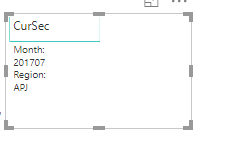
Thanks @AlB for your guidance. i have implemented this working fine 🙂
i just modified code instead of applied filter.values i have given my field name 🙂 by that user can know from which field the value selected.
created two seperate measures and final measure clubbed first two measures and added cascade object to the final measure 🙂
Best
Chanty
- Mark as New
- Bookmark
- Subscribe
- Mute
- Subscribe to RSS Feed
- Permalink
- Report Inappropriate Content
Ok understood. thanks alot for your steps.
i will try and update you with solutions 🙂
Best
Chanty
Helpful resources

Power BI Dataviz World Championships
The Power BI Data Visualization World Championships is back! Get ahead of the game and start preparing now!

Power BI Monthly Update - December 2025
Check out the December 2025 Power BI Holiday Recap!

FabCon Atlanta 2026
Join us at FabCon Atlanta, March 16-20, for the ultimate Fabric, Power BI, AI and SQL community-led event. Save $200 with code FABCOMM.

| User | Count |
|---|---|
| 39 | |
| 37 | |
| 33 | |
| 32 | |
| 29 |


| User | Count |
|---|---|
| 133 | |
| 88 | |
| 85 | |
| 68 | |
| 64 |


