Don't miss your chance to take the Fabric Data Engineer (DP-700) exam on us!
Learn moreWe've captured the moments from FabCon & SQLCon that everyone is talking about, and we are bringing them to the community, live and on-demand. Starts on April 14th. Register now
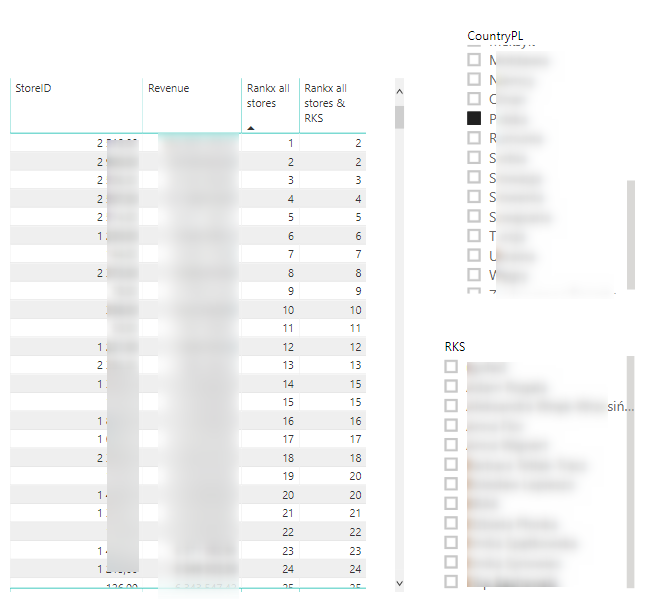
I have a problem with the Rankx all stores & RKS column.
I want it to show the ranking of a given store within all RKS.
To sum up: the Rankx all stores column shows a dynamic ranking depending on which country and RKS you choose - it works properly.
The Rankx all stores & RKS column should show a dynamic ranking depending on which country you choose, but it should not work with the RKS filter - it should show a total ranking in all RKS.
Code column rankx all stores & RKS:
Rankx all stores & RKS = RANKX(
ALL(DimLocalization[RKS];DimLocalization[StoreID]);
CALCULATE(SUM(FactSales[Revenue_Net]))
I think I did not suggest any column. All these articles talk about various kinds of ranks. Can you please create some sample data and share with expected output
This sounds like a place for ALLEXCEPT()
CALCULATE(SUM(FactSales[Revenue_Net]))
CALCULATE(SUM(FactSales[REvenue_Net]),ALLEXCEPT(RKS))
Help when you know. Ask when you don't!
If you have recently started exploring Fabric, we'd love to hear how it's going. Your feedback can help with product improvements.
A new Power BI DataViz World Championship is coming this June! Don't miss out on submitting your entry.
Share feedback directly with Fabric product managers, participate in targeted research studies and influence the Fabric roadmap.
| User | Count |
|---|---|
| 53 | |
| 36 | |
| 33 | |
| 19 | |
| 17 |
| User | Count |
|---|---|
| 73 | |
| 72 | |
| 38 | |
| 35 | |
| 26 |