Don't miss your chance to take the Fabric Data Engineer (DP-600) exam for FREE! Find out how by watching the DP-600 session on-demand now through April 28th.
Learn moreJoin the FabCon + SQLCon recap series. Up next: Power BI, Real-Time Intelligence, IQ and AI, and Data Factory take center stage. All sessions are available on-demand after the live show. Register now
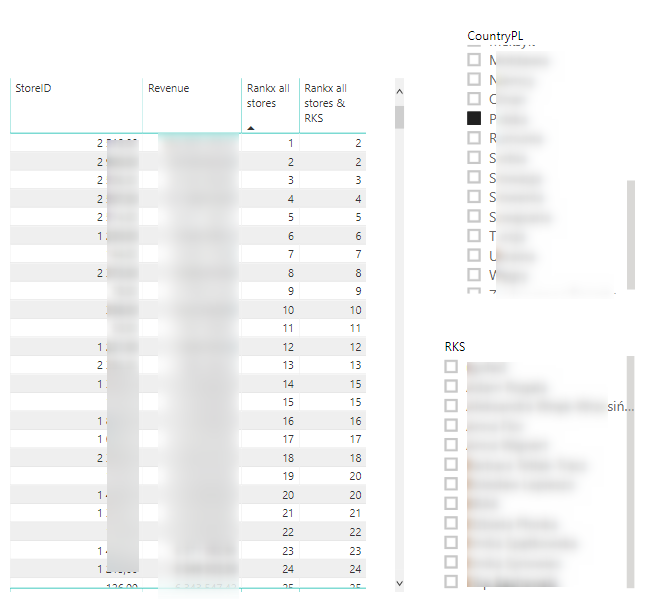
I have a problem with the Rankx all stores & RKS column.
I want it to show the ranking of a given store within all RKS.
To sum up: the Rankx all stores column shows a dynamic ranking depending on which country and RKS you choose - it works properly.
The Rankx all stores & RKS column should show a dynamic ranking depending on which country you choose, but it should not work with the RKS filter - it should show a total ranking in all RKS.
Code column rankx all stores & RKS:
Rankx all stores & RKS = RANKX(
ALL(DimLocalization[RKS];DimLocalization[StoreID]);
CALCULATE(SUM(FactSales[Revenue_Net]))
I think I did not suggest any column. All these articles talk about various kinds of ranks. Can you please create some sample data and share with expected output
This sounds like a place for ALLEXCEPT()
CALCULATE(SUM(FactSales[Revenue_Net]))
CALCULATE(SUM(FactSales[REvenue_Net]),ALLEXCEPT(RKS))
Help when you know. Ask when you don't!
Check out the April 2026 Power BI update to learn about new features.
If you have recently started exploring Fabric, we'd love to hear how it's going. Your feedback can help with product improvements.
A new Power BI DataViz World Championship is coming this June! Don't miss out on submitting your entry.
| User | Count |
|---|---|
| 43 | |
| 38 | |
| 34 | |
| 20 | |
| 16 |
| User | Count |
|---|---|
| 66 | |
| 65 | |
| 30 | |
| 26 | |
| 25 |