
cancel
Showing results for 
Search instead for 
Did you mean: 

July 28 - August 9 | Final Round of the Power BI Dataviz World Championships. This is your chance. Learn more

Reply
cchilton
Helper I
Helper I

RANKX Allselected and Filtering Data

I have a table of values I want to Rank in order. The column value is a calculated measure. It is not just a column in a table. 


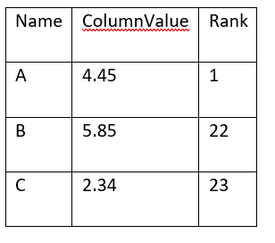
When I use this formula I get the following output: 

Rank Name = RANKX(ALL(Table[Name]),[ColumnValue],,ASC)

cchilton_1-1667413785573.png

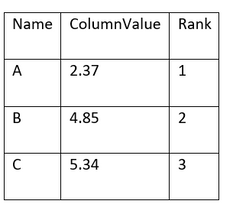
When I use the following formula I get the Rank I am expecting

Rank Name = RANKX(ALLSELECTED(Table[Name]),[ColumnValue],,ASC)

cchilton_2-1667414078446.png


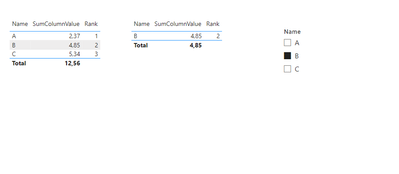
My issue is that I want to be able to apply a filter by Name. 

Example if I select "B" it should only show "B" with a rank of 2. However, I cannot get the rank to stay when I use ALLSELECTED which shows the correct ranking order.  Not matter how I filter the "Name" category it shows the rank as 1. I assume because there is only 1 Name being shown so in the rank it would be 1 because it isn't being compared to something else. 


Question: 

How do I get the correct rank order AND have that rank stay when I filter the data. Thank you.  


3 REPLIES 3
vojtechsima
Super User
Super User

Hi, @cchilton ,
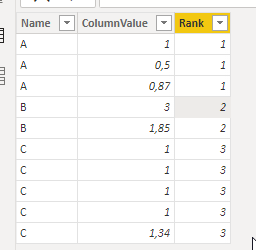
Can't you calculate the rank as Calculated Column?

Something like this:

vojtechsima_0-1667417072615.png

Rank = RANKX(FILTER(Ranking, Ranking[Name] <= EARLIER(Ranking[Name])), Ranking[Name],,ASC, Dense)

And then it stays every time the same?

vojtechsima_1-1667417097551.png


Any kudos or recognition appreciated. To learn more on the topic, check out my blog and follow me on LinkedIn.

Thank you for your response! I tried what you suggested and this didn't work for me. My table has millions of rows and in prod more rows will be added all the time. Thus get an error saying there isn't enough memory so I think it has to be a measure. 


I did find this when researching and this almost works. 

Rank =
RANKX(
FILTER(
ALL(Table[column]),
NOT(ISBLANK([Measure]))
),
[Measure],,ASC,Dense

)


This is the result. It is missing numbers and row 1 is duplicated. From what I have found the issue has something to do with Blanks? I am very new to DAX and Power Bi so I am not sure. I am closer to an answer though so that makes me hopeful. 

cchilton_0-1667482365590.png


@cchilton 
Could you please give me sample data, so I can test my suggestions please?


Any kudos or recognition appreciated. To learn more on the topic, check out my blog and follow me on LinkedIn.

Helpful resources

Announcements
FabCon and SQLCon Barcelona 2026

FabCon & SQLCon – Barcelona 2026

Join us in Barcelona for FabCon and SQLCon, the Fabric, Power BI, SQL, and AI community event. Save €200 with code FABCMTY200.

Fabric Community Sticker Design Challenge Barcelona Carousel

Fabric Community Sticker Challenge - Barcelona 2026

If you love stickers, then you will definitely want to check out our community sticker challenge, Barcelona edition!

July Power BI Update Carousel

Power BI Monthly Update - July 2026

Check out the July 2026 Power BI update to learn about new features.

Power BI DataViz World Championships carousel

Power BI DataViz World Championships - June 2026

A new Power BI DataViz World Championship is coming this June! Don't miss out on submitting your entry.