Don't miss your chance to take the Fabric Data Engineer (DP-700) exam on us!
Learn moreWe've captured the moments from FabCon & SQLCon that everyone is talking about, and we are bringing them to the community, live and on-demand. Starts on April 14th. Register now
Hello.
This is an R-script that fetches data from an open source and attempts to apply seasonal adjustments to the time series with ARIMA using x12 in R
library(dplyr)
require(tidyr)
require(x12)
get_data <- function() {
url <- "https://px.hagstofa.is:443/pxis/sq/61359243-62a0-4f2b-99b6-aa3c31267fab"
markadsverd_nsa <- read.csv(url,
sep = "\t")
colnames(markadsverd_nsa) <- c("Period", "Visitala", "Value")
markadsverd_nsa$Value[markadsverd_nsa$Value == ".."] <- NA
markadsverd_nsa$Value <- as.numeric(as.character(markadsverd_nsa$Value))
# Rename the "Visitala"
markadsverd_nsa$Visitala <- as.character(markadsverd_nsa$Visitala)
markadsverd_nsa$Visitala[markadsverd_nsa$Visitala == "Höfuðborgarsvæði - Fjölbýli"] <- "Hbsv_Fjolbyli"
markadsverd_nsa$Visitala[markadsverd_nsa$Visitala == "Höfuðborgarsvæði - Einbýli"] <- "Hbsv_Einbyli"
markadsverd_nsa$Visitala[markadsverd_nsa$Visitala == "Utan höfuðborgarsvæðis - Alls"] <- "Landsb_Alls"
markadsverd_nsa$Visitala[markadsverd_nsa$Visitala == "Landið - Alls"] <- "Landid_Alls"
# Convert to wide format
markadsverd_nsa <- spread(data = markadsverd_nsa, value = "Value", Visitala)
return(markadsverd_nsa)
}
### Performing seasonal adjustment ##
# We begin by downloading the data
markadsverd_nsa <- get_data()
# The x12 function only wants to work with one time series at a time.
# Let’s focus on foreign passengers. The serie needs to be defined as a ts time series object.
mverd_fjolbyli <- ts(markadsverd_nsa$Hbsv_Fjolbyli, frequency = 12, start = c(2000,3))
mverd_einbyli <- ts(markadsverd_nsa$Hbsv_Einbyli, frequency = 12, start = c(2000,3))
mverd_landsbyggd <- ts(markadsverd_nsa$Landsb_Alls, frequency = 12, start = c(2000,3))
mverd_landid <- ts(markadsverd_nsa$Landid_Alls, frequency = 12, start = c(2000,3))
# The seasonal adjustment is performed with the function x12 and returns an S4 object of the class x12Output.
mverd_fjolbyli_sa <- x12(mverd_fjolbyli)
mverd_fjolbyli_sa <-mverd_fjolbyli_sa@d11
mverd_einbyli_sa <- x12(mverd_einbyli)
mverd_einbyli_sa <- mverd_einbyli_sa@d11
mverd_landsbyggd_sa <- x12(mverd_landsbyggd)
mverd_landsbyggd_sa <- mverd_landsbyggd_sa@d11
mverd_landid_sa <- x12(mverd_landid)
mverd_landid_sa <- mverd_landid_sa@d11
markadsverd_sa <- cbind.data.frame(mverd_einbyli_sa, mverd_fjolbyli_sa, mverd_landid_sa, mverd_landsbyggd_sa)
markadsverd <-cbind(markadsverd_nsa,markadsverd_sa)
# For a list of more slots see the documentation on the x12Output class in the manual for the x12 package (see here).
# Another interesting thing to observe is the seasonal factors. Those can be plotted directly with the convenience function plotSeasFac. The plot for our data looks like this.
#plotSeasFac(mverd_fjolbyli_sa)
I'm running this script in Power BI Desktop. It simply does not work on my computer but works on another with older version of R installed.
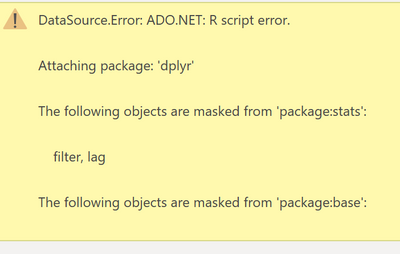
This is the error I get. Well, according to R specialists this is just a warning and should not stop the calculation but it does in Power BI Desktop.
What I've tried so far is
How can I run R-scripts successfully ignoring the warnings?
Hi @Yggdrasill ,
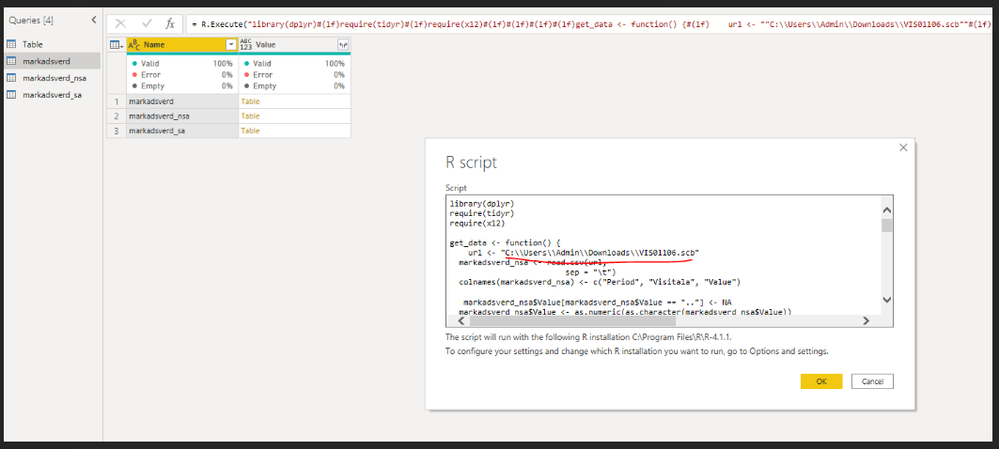
The issue could happen at the url:
url <- "https://px.hagstofa.is:443/pxis/sq/61359243-62a0-4f2b-99b6-aa3c31267fab"
When I read this file in R directly, it returns error:
If I download this file and store to the local to replace the path, it works:
So you can try to store the url file to local and check.
In addition, here is a similar thread that provides another workaround that you can also refer:
Remote connection cannot fetch any data from internet
Best Regards,
Community Support Team _ Yingjie Li
If this post helps, then please consider Accept it as the solution to help the other members find it more quickly.
Hi and thanks for the reply. I don't believe that's the issue here since I can read the URL via Rstudio
For example I can succesfully get data with this command:
data <- read.csv('http://archive.ics.uci.edu/ml/machine-learning-databases/iris/iris.data')
What you should try instead of letting R fetch the data, let Power Query fetch it instead and then try to exectue R script - like so:
let
//POWER QUERY FETCHES DATA AND TRANSFORMS PROPERLY
Source = Csv.Document(
Web.Contents("https://px.hagstofa.is:443/pxis/sq/61359243-62a0-4f2b-99b6-aa3c31267fab"),
[Delimiter = " ", Columns = 3, Encoding = 1252, QuoteStyle = QuoteStyle.None]
),
#"Promoted Headers" = Table.PromoteHeaders(Source, [PromoteAllScalars = true]),
#"Changed Type" = Table.TransformColumnTypes(
#"Promoted Headers",
{{"Mánuður", type text}, {"Vísitala", type text}, {"Vísitala neysluverðs", type number}}
),
#"Pivoted Column" = Table.Pivot(
#"Changed Type",
List.Distinct(#"Changed Type"[Vísitala]),
"Vísitala",
"Vísitala neysluverðs",
List.Sum
),
#"Renamed Columns" = Table.RenameColumns(
#"Pivoted Column",
{
{"Höfuðborgarsvæði - Einbýli", "Hbsv_Einbyli"},
{"Höfuðborgarsvæði - Fjölbýli", "Hbsv_Fjolbyli"},
{"Landið - Alls", "Landid_Alls"},
{"Utan höfuðborgarsvæðis - Alls", "Landsb_Alls"}
}
),
//EXECUTE R SCRIPT USING TIDYR and X12 FUNCTIONS
#"Execute R" = R.Execute(
"library(dplyr)
#(lf)require(tidyr)
#(lf)require(x12)
#(lf)#(lf)#(lf)##
# Performing seasonal adjustment ###(lf)
# We begin by downloading the data#(lf)
// THIS COMMAND READS PQ DATA TO R !
markadsverd_nsa <- dataset#(lf)#(lf)
# The x12 function only wants to work with one time series at a time. #(lf)
# Let’s focus on foreign passengers. The serie needs to be defined as a ts time series object.#
(lf)mverd_fjolbyli <- ts(markadsverd_nsa$Hbsv_Fjolbyli, frequency = 12, start = c(2000,3))#(lf)mverd_einbyli <- ts(markadsverd_nsa$Hbsv_Einbyli, frequency = 12, start = c(2000,3))#(lf)mverd_landsbyggd <- ts(markadsverd_nsa$Landsb_Alls, frequency = 12, start = c(2000,3))#(lf)mverd_landid <- ts(markadsverd_nsa$Landid_Alls, frequency = 12, start = c(2000,3))#(lf)#
(lf)#(lf)# The seasonal adjustment is performed with the function x12 and returns an S4 object of the class x12Output.#(lf)#(lf)
mverd_fjolbyli_sa <- x12(mverd_fjolbyli) #(lf)
mverd_fjolbyli_sa <-mverd_fjolbyli_sa@d11#(lf)#(lf)
mverd_einbyli_sa <- x12(mverd_einbyli) #(lf)
mverd_einbyli_sa <- mverd_einbyli_sa@d11#(lf)#(lf)
mverd_landsbyggd_sa <- x12(mverd_landsbyggd) #(lf)
mverd_landsbyggd_sa <- mverd_landsbyggd_sa@d11#(lf)#(lf)
mverd_landid_sa <- x12(mverd_landid) #(lf)
mverd_landid_sa <- mverd_landid_sa@d11#(lf)#(lf)
markadsverd_sa <- cbind.data.frame(mverd_einbyli_sa, mverd_fjolbyli_sa, mverd_landid_sa, mverd_landsbyggd_sa)#(lf)
markadsverd <-cbind(markadsverd_nsa,markadsverd_sa)#(lf)
# For a list of more slots see the documentation on the x12Output class in the manual for the x12 package (see here).#(lf)#(lf)
# Another interesting thing to observe is the seasonal factors. Those can be plotted directly with the convenience function plotSeasFac. The plot for our data looks like this.#(lf)#(lf)#plotSeasFac(mverd_fjolbyli_sa)"
),
markadsverd1 = Source{[Name = "markadsverd"]}[Value],
#"Added Custom Column" = Table.AddColumn(
markadsverd1,
"Date",
each Text.Combine({Text.Middle([Period], 5), ".", Text.Start([Period], 4)}),
type text
),
#"Changed Type2" = Table.TransformColumnTypes(#"Added Custom Column", {{"Date", type date}}),
#"Reordered Columns" = Table.ReorderColumns(
#"Changed Type2",
{
"Date",
"Period",
"Hbsv_Einbyli",
"Hbsv_Fjolbyli",
"Landid_Alls",
"Landsb_Alls",
"mverd_einbyli_sa",
"mverd_fjolbyli_sa",
"mverd_landid_sa",
"mverd_landsbyggd_sa"
}
)
in
#"Reordered Columns"
This should do the exact same thing as the script I posted earlier but instead I use PQ to fetch the data and then try to exectue R-script with.
The R command
markadsverd_nsa <- dataset
will fetch the PQ data
I get this to work up until the script attempts to run the packages from R ! and I don't know why 😞
@Yggdrasill Perhaps try:
options(warn=-1)
If you have recently started exploring Fabric, we'd love to hear how it's going. Your feedback can help with product improvements.
A new Power BI DataViz World Championship is coming this June! Don't miss out on submitting your entry.
Share feedback directly with Fabric product managers, participate in targeted research studies and influence the Fabric roadmap.
| User | Count |
|---|---|
| 55 | |
| 34 | |
| 31 | |
| 19 | |
| 17 |
| User | Count |
|---|---|
| 74 | |
| 71 | |
| 38 | |
| 35 | |
| 25 |