Get certified for free when you join Fabric Data Days 2026 and dive into Fabric, Power BI, SQL, AI, and other essential data skills.
Join nowJuly 7 - July 17 | Round 2 of the Power BI Dataviz World Championships. Don't miss your chance! Learn more
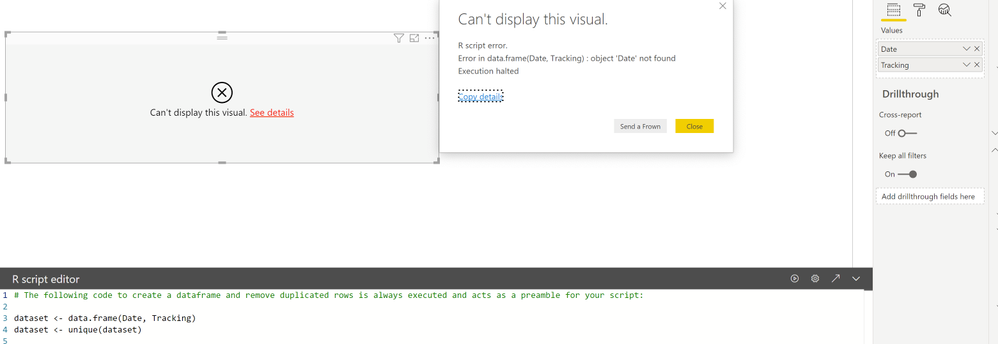
I am using the R script editor in Power BI. I selected the fields need for my visualization in the values section in the Visualization pane. When I ran the code to just sent test, I . got a message stating, "Can't display this visual. R Script error. Error in data.frame(Date, Tracking): object 'Date not found Execution halted.
Afterwards, I pasted the full code for my visualization and I got the same answer. I already tested the code in RStudio and it worked fine on that program.
I'm unsure why Power BI is not detecting the columns in the data frame, because clearly the fields I selected are in the data frame generated by Power BI. How do I resolve this issue?
Hi @Anonymous ,
Please update the R version to supported version R 3.3.1, R 3.3.0, MRO 3.3.1, MRO 3.3.0, MRO 3.2.2 then test again.
If issue persists, please enable desktop trace log, repeat steps until error occurs, share trace log files with us.
Hi,
I have R-3.6.1 so I will un-install and download the versions you mentioned. Thanks for your quick response.
Best
Join us in Barcelona for FabCon and SQLCon, the Fabric, Power BI, SQL, and AI community event. Save €200 with code FABCMTY200.
Join Fabric Data Days 2026: 60 days of free live/on-demand sessions, challenges, study groups, and certification opportunities.
| User | Count |
|---|---|
| 23 | |
| 22 | |
| 18 | |
| 17 | |
| 13 |
| User | Count |
|---|---|
| 67 | |
| 48 | |
| 46 | |
| 41 | |
| 39 |