This time we’re going bigger than ever. Fabric, Power BI, SQL, AI and more. We're covering it all. You won't want to miss it.
Learn moreDid you hear? There's a new SQL AI Developer certification (DP-800). Start preparing now and be one of the first to get certified. Register now
I choose R Script as the data source.
In the box that gets displayed I insert this script:
dataset=c(1,3,5,6,8,9,20)
I click OK.
The Navigator is displayed and comes up with a empty directory called R:. Now what?
The same thing for not so simple scripts as well.
Solved! Go to Solution.
Hi @mysorian,
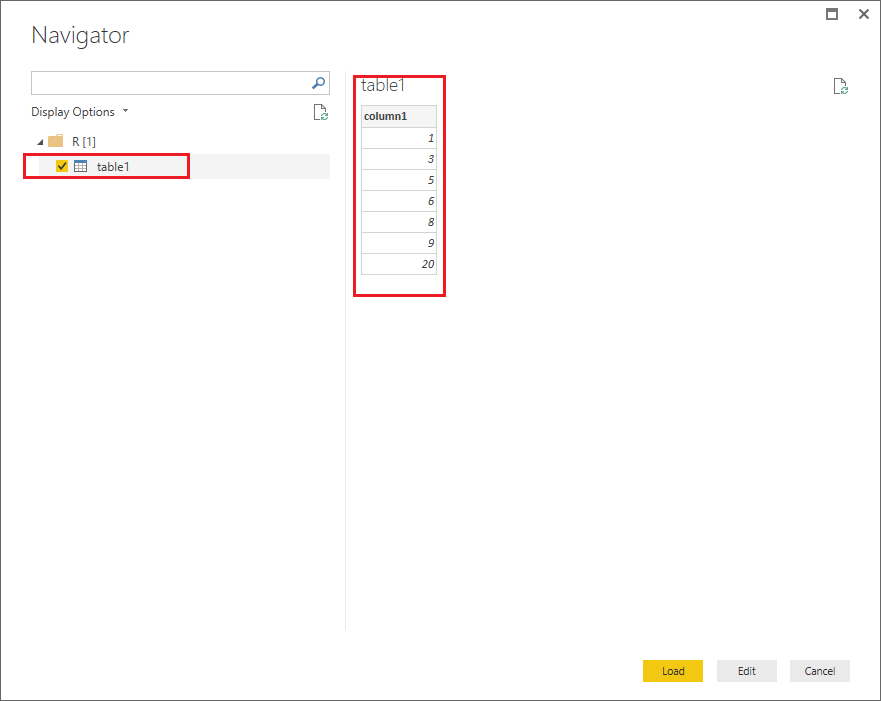
You should include a data frame which is used for storing data tables at the end your script, then it should work as expected.![]()
column1=c(1,3,5,6,8,9,20) table1=data.frame(column1)
Regards
Hi @mysorian,
You should include a data frame which is used for storing data tables at the end your script, then it should work as expected.![]()
column1=c(1,3,5,6,8,9,20) table1=data.frame(column1)
Regards
Have you configured Power BI desktop to use whatever local R you have installed?
Check out the April 2026 Power BI update to learn about new features.
Sign up to receive a private message when registration opens and key events begin.
If you have recently started exploring Fabric, we'd love to hear how it's going. Your feedback can help with product improvements.
| User | Count |
|---|---|
| 34 | |
| 31 | |
| 25 | |
| 20 | |
| 16 |
| User | Count |
|---|---|
| 61 | |
| 49 | |
| 28 | |
| 23 | |
| 23 |