cancel
Showing results for 
Search instead for 
Did you mean: 

Data Days is here! Join us now for 60+ days of learning, challenges, and connection. Learn more

Reply
espo4life
Helper I
Helper I

R Visual Control Question

I have an R visual that displays this
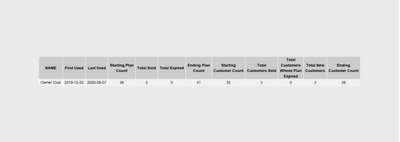
Annotation 2020-06-12 144003.png


here is the R script I am using

#dataset <- data.frame(TheDate)
#dataset <- unique(dataset)
require(RODBC)

z <- nrow(dataset)
x <- dataset[z,1]
y <- dataset[1,1]

require(RODBC)
library(gridExtra)
library(dplyr)
library(ggplot2)

ch <- odbcDriverConnect(".....)

resultset = sqlQuery(ch, paste0("SELECT * FROM [dbo].[fnCUSTCLUBPLAN] ('",y,"','",x,"')"))
colnames(resultset)
colnames(resultset) <- sapply(colnames(resultset) , function(x) paste(strwrap(x, width = 15), collapse="\n"))
qplot(x=1:5, y=1:5, geom = "blank") + theme(line = element_blank(), text = element_blank()) + 
annotation_custom(grob=tableGrob(resultset, rows=NULL))

close(ch)


My questions are:


1. Can I control how big the visual is rentered and resize the whole area without resizing the table?

2. Can I do some better formatting (like heading backgrounds, etc)?

1 ACCEPTED SOLUTION
v-yingjl
Community Support
Community Support

Hi @espo4life ,

You can refer these issues and articles that hope to help you:

  1. R plotly custom visualization margin padding 
  2. R Visual with transparent background 
  3. How to create R custom visual (html) in PowerBI 
  4. A Guide to Using R with Power BI 


Best Regards,
Yingjie Li

If this post helps then please consider Accept it as the solution to help the other members find it more quickly.

View solution in original post

1 REPLY 1
v-yingjl
Community Support
Community Support

Hi @espo4life ,

You can refer these issues and articles that hope to help you:

  1. R plotly custom visualization margin padding 
  2. R Visual with transparent background 
  3. How to create R custom visual (html) in PowerBI 
  4. A Guide to Using R with Power BI 


Best Regards,
Yingjie Li

If this post helps then please consider Accept it as the solution to help the other members find it more quickly.

Helpful resources

Announcements
Fabric Data Days is here Carousel

Fabric Data Days 2026

Don't miss out on Data Days, June 15 through August 7. Learn Fabric, Power BI, SQL, AI and more.

May Power BI Update Carousel

Power BI Monthly Update - May 2026

Check out the May 2026 Power BI update to learn about new features.

Power BI DataViz World Championships carousel

Power BI DataViz World Championships - June 2026

A new Power BI DataViz World Championship is coming this June! Don't miss out on submitting your entry.