Join us at FabCon Atlanta from March 16 - 20, 2026, for the ultimate Fabric, Power BI, AI and SQL community-led event. Save $200 with code FABCOMM.
Register now!The Power BI Data Visualization World Championships is back! Get ahead of the game and start preparing now! Learn more
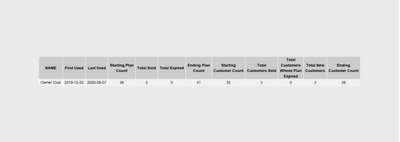
I have an R visual that displays this
here is the R script I am using
#dataset <- data.frame(TheDate)
#dataset <- unique(dataset)
require(RODBC)
z <- nrow(dataset)
x <- dataset[z,1]
y <- dataset[1,1]
require(RODBC)
library(gridExtra)
library(dplyr)
library(ggplot2)
ch <- odbcDriverConnect(".....)
resultset = sqlQuery(ch, paste0("SELECT * FROM [dbo].[fnCUSTCLUBPLAN] ('",y,"','",x,"')"))
colnames(resultset)
colnames(resultset) <- sapply(colnames(resultset) , function(x) paste(strwrap(x, width = 15), collapse="\n"))
qplot(x=1:5, y=1:5, geom = "blank") + theme(line = element_blank(), text = element_blank()) +
annotation_custom(grob=tableGrob(resultset, rows=NULL))
close(ch)
My questions are:
1. Can I control how big the visual is rentered and resize the whole area without resizing the table?
2. Can I do some better formatting (like heading backgrounds, etc)?
Solved! Go to Solution.
Hi @espo4life ,
You can refer these issues and articles that hope to help you:
Best Regards,
Yingjie Li
If this post helps then please consider Accept it as the solution to help the other members find it more quickly.
Hi @espo4life ,
You can refer these issues and articles that hope to help you:
Best Regards,
Yingjie Li
If this post helps then please consider Accept it as the solution to help the other members find it more quickly.
The Power BI Data Visualization World Championships is back! Get ahead of the game and start preparing now!
| User | Count |
|---|---|
| 41 | |
| 40 | |
| 33 | |
| 29 | |
| 27 |
| User | Count |
|---|---|
| 131 | |
| 105 | |
| 60 | |
| 56 | |
| 55 |