Learn from the best! Meet the four finalists headed to the FINALS of the Power BI Dataviz World Championships! Register now
Hi there
I ran the following script in R studio and it runs successfully.
adult = data(Adult)
DATAFRAME(head(Adult))
DATAFRAME(head(Adult), setStart = '', itemSep = ' + ', setEnd = '')
rules <- apriori(Adult,
parameter = list(supp = 0.5, conf = 0.9, target = "rules"))
rules <- head(rules, by = "conf")
DATAFRAME(rules)
DATAFRAME(rules, separate = TRUE)
DATAFRAME(rules, separate = TRUE, setStart = '', itemSep = ' + ', setEnd = '')
When I run this through Get Data in Powerbi It doesnt work.
I saw this video https://www.youtube.com/watch?v=CzeeTXvun5c&app=desktop
Following similar concept except different dataset this seems to work and I dont know why. I tried different R version from 3.2.5 to 3.4.1 but not worked. I have arules, Matrix and methods installed on all version.
I am on PowerBI desktop July update.
Any advice would be greateful.
Pedzilla
Solved! Go to Solution.
Hey,
you have to add 2 lines of code to your R scrip:
the first line has to be
library("arules");
this "loads" the arules library into the Power BI session and you have to explicitly return a dataframe to Power BI, this dataframe will then be treated as a table, so for this reason your last 3 lines of your R script shoud look like this:
df1 <- DATAFRAME(rules)
df2 <- DATAFRAME(rules, separate = TRUE)
df3 <- DATAFRAME(rules, separate = TRUE, setStart = '', itemSep = ' + ', setEnd = '')
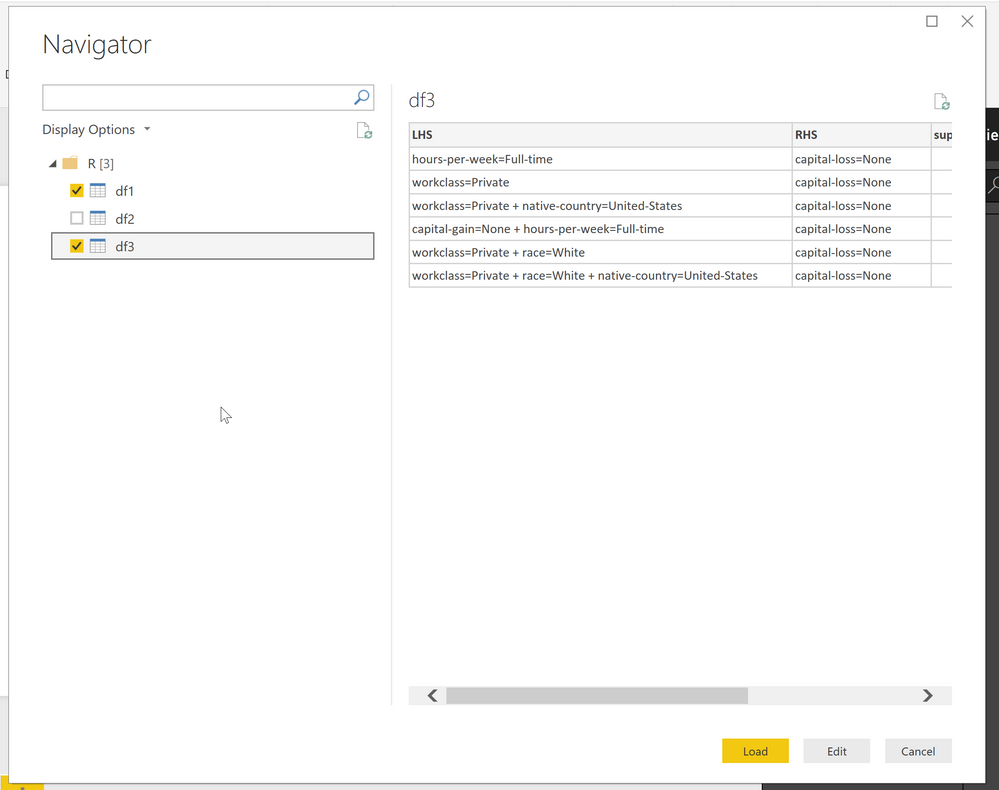
Then the Get Dialog will present you 3 dataframes:
Hope this helps
Hey,
you have to add 2 lines of code to your R scrip:
the first line has to be
library("arules");
this "loads" the arules library into the Power BI session and you have to explicitly return a dataframe to Power BI, this dataframe will then be treated as a table, so for this reason your last 3 lines of your R script shoud look like this:
df1 <- DATAFRAME(rules)
df2 <- DATAFRAME(rules, separate = TRUE)
df3 <- DATAFRAME(rules, separate = TRUE, setStart = '', itemSep = ' + ', setEnd = '')
Then the Get Dialog will present you 3 dataframes:
Hope this helps
| User | Count |
|---|---|
| 55 | |
| 37 | |
| 23 | |
| 17 | |
| 17 |
| User | Count |
|---|---|
| 69 | |
| 58 | |
| 39 | |
| 21 | |
| 21 |