This is best Fabric, Power BI, SQL and AI community event. How do we know? The last event sold out! Save €200 with code FABCMTY200.
Register nowA new Data Days event is coming soon! This time we’re going bigger than ever. Fabric, Power BI, SQL, AI and more. Don't miss out.
Hi all,
I have a question about running a market basked analysis in R on a filtered dataset.
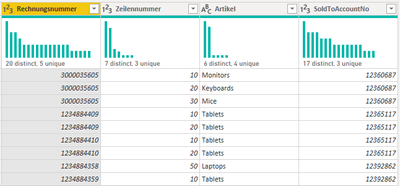
My dataset contains Invoice Number, Position, Article and SoldToAccount.
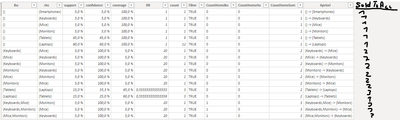
I would like to run the R code for each SoldToAccountNr indivdually and add it in a new column to the result to later compare them.
So the end result should look like this were I can see the customer number.
Do you think this is possible?
File: https://filebin.net/hqdd2woqyifqytl9
Thank you very much in advance. 🙂
Hi @LillyLegenda ,
This is a link to related content, I hope it will help you:
https://community.powerbi.com/t5/Desktop/Run-R-Script-to-create-new-column/m-p/784924
https://docs.microsoft.com/en-us/power-bi/connect-data/desktop-r-in-query-editor
Best Regards,
Liu Yang
If this post helps, then please consider Accept it as the solution to help the other members find it more quickly.
Check out the May 2026 Power BI update to learn about new features.
Sign up to receive a private message when registration opens and key events begin.
If you have recently started exploring Fabric, we'd love to hear how it's going. Your feedback can help with product improvements.
| User | Count |
|---|---|
| 27 | |
| 26 | |
| 22 | |
| 19 | |
| 17 |
| User | Count |
|---|---|
| 45 | |
| 43 | |
| 41 | |
| 21 | |
| 20 |