cancel
Showing results for 
Search instead for 
Did you mean: 

July 7 - July 17 | Round 2 of the Power BI Dataviz World Championships. Don't miss your chance! Learn more

Reply
Anonymous
Not applicable

Quick Measure MoM%

Hi

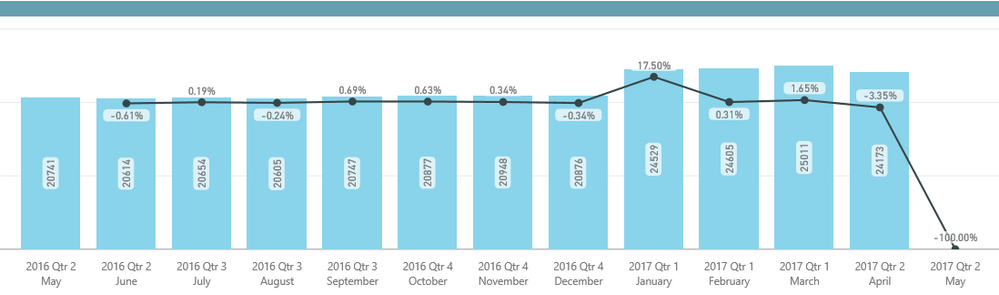
When using the MoM% quick measure Power BI is also returning values for the last month PLUS 1. I.e. If my last period is May 2017, then the quick measure calculates the MoM% for June 2017 which creates a distortion when looking at the chart/data.

Have anybody come across this issue?

Thanks,

MoM.PNG

1 ACCEPTED SOLUTION
Vvelarde
Community Champion
Community Champion

@Anonymous


Hi, made a adjustment to the quick measure. Add before a condition to evaluate the Date.


Value MoM%-Modified = 
If (VALUES(Table1[Date])<>BLANK(),
IF(
	ISFILTERED('Table1'[Date]),
	ERROR("Time intelligence quick measures can only be grouped or filtered by the Power BI-provided date hierarchy."),
	VAR __PREV_MONTH =
		CALCULATE(SUM('Table1'[Value]), DATEADD('Table1'[Date].[Date], -1, MONTH))
	RETURN
		DIVIDE(SUM('Table1'[Value]) - __PREV_MONTH, __PREV_MONTH)
))

Regards


Victor

Lima - Peru

MoM%.png


Lima - Peru

View solution in original post

4 REPLIES 4
bi_expt08
Regular Visitor

You can also use below DAX in a measure instead of quick measure to solve the distortion in the beginning as well as at the end of the visuals. Here you just have to create one more measure for prior month instaed of defining a variable within the measure itself.

Current_Month_Value = SUM('Table1"[Value])

Prior_Month_Value = CALCULATE('Table1'[Value], PREVIOUSMONTH('Table1'[Date]))

%_MoM_Modified_Value
IF(
   AND(
           'Table1'[Value]<>Blank(),

           'Table1'[Prior_Month_Value]<>Blank()

),

            DIVIDE([Value],[Prior_Month_Value],Blank())-1,
            Blank()
)

Vvelarde
Community Champion
Community Champion

@Anonymous


Hi, made a adjustment to the quick measure. Add before a condition to evaluate the Date.


Value MoM%-Modified = 
If (VALUES(Table1[Date])<>BLANK(),
IF(
	ISFILTERED('Table1'[Date]),
	ERROR("Time intelligence quick measures can only be grouped or filtered by the Power BI-provided date hierarchy."),
	VAR __PREV_MONTH =
		CALCULATE(SUM('Table1'[Value]), DATEADD('Table1'[Date].[Date], -1, MONTH))
	RETURN
		DIVIDE(SUM('Table1'[Value]) - __PREV_MONTH, __PREV_MONTH)
))

Regards


Victor

Lima - Peru

MoM%.png


Lima - Peru

Why 

VALUES(Table1[Date])<>BLANK() not works for me?  it show error message, you expeted return a sing value. So I changed values to Max or Min


Anonymous
Not applicable

Thanks so much Victor! 

This worked just prefect !

Helpful resources

Announcements
FabCon and SQLCon Barcelona 2026

FabCon & SQLCon – Barcelona 2026

Join us in Barcelona for FabCon and SQLCon, the Fabric, Power BI, SQL, and AI community event. Save €200 with code FABCMTY200.

60 days of Data Days Carousel

Data Days 2026

Join Fabric Data Days 2026: 60 days of free live/on-demand sessions, challenges, study groups, and certification opportunities.

Power BI DataViz World Championships carousel

Power BI DataViz World Championships - June 2026

A new Power BI DataViz World Championship is coming this June! Don't miss out on submitting your entry.