cancel
Showing results for 
Search instead for 
Did you mean: 

Vote for your favorite vizzies from the Power BI Dataviz World Championship submissions. Vote now!

Reply
vipinkmathews
Advocate III
Advocate III

Questions on Visualizations

Hi


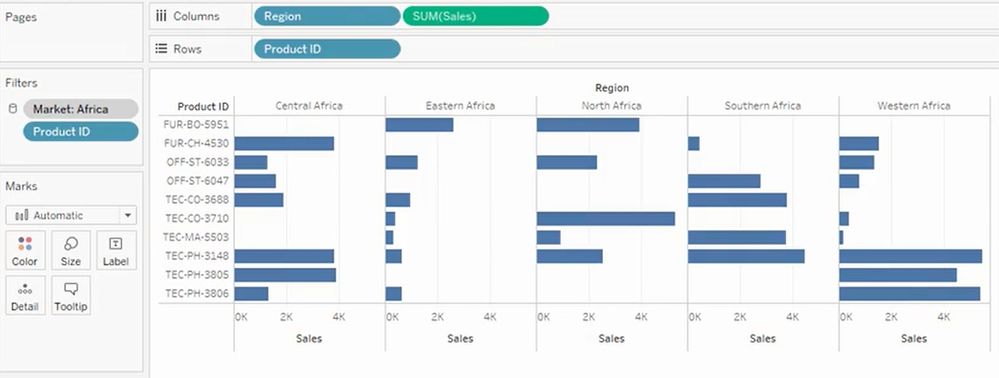
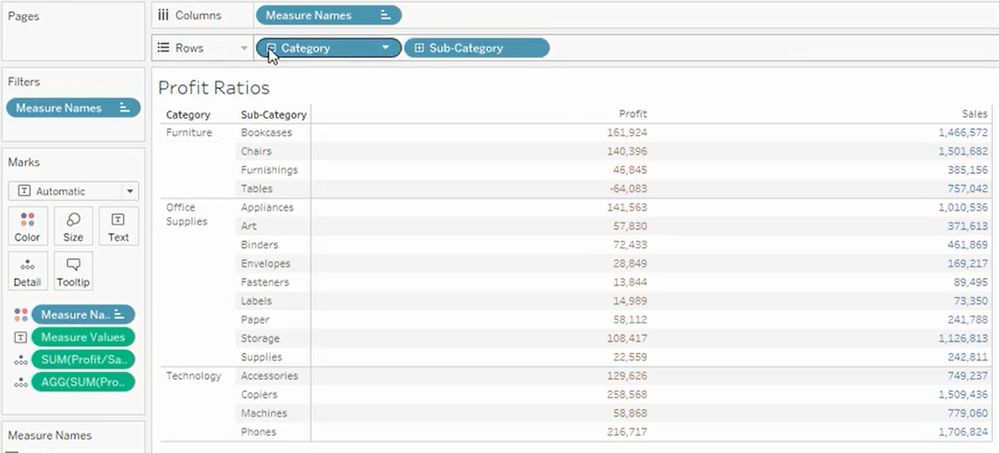
Recently I have checked Tableau for a new request. I could see some of the visuals created as below by just drag and drop the field to the Row & Column shelves.


Please let me know if the same can be achieved through Power BI. If so which visuals should I use to get the same appearance. 


Do I need to use any Group By for the second image in Power BI but tableau automatically maintains the hierarchy without any manual grouping by the user.


Stacked Column chart.jpgMatrix.jpg


1 ACCEPTED SOLUTION
stretcharm
Memorable Member
Memorable Member


Unfortunatly small multiples is currently an ommisiton in powerbi (with the exception of some custom visuals e.g. dot plot)

So your options are create several bar charts side by side (tricky to keep the axis the same) or use r visuals.


r visuals can do pretty much anything however you'll need r installing and a bit of r knowledge.

http://www.sthda.com/english/wiki/ggplot2-barplot-easy-bar-graphs-in-r-software-using-ggplot2


Hierarchies are easy in powerbi for matrix or some charts. You can drop in fields in the correct order and it will create the hierachy for you.

https://docs.microsoft.com/en-us/power-bi/desktop-matrix-visual

You can also create a hierachy in the fields lists by dropping a field onto another. This can then be dropped in to the visuals.

https://www.youtube.com/watch?v=q8WDUAiTGeU


Phil


View solution in original post

1 REPLY 1
stretcharm
Memorable Member
Memorable Member


Unfortunatly small multiples is currently an ommisiton in powerbi (with the exception of some custom visuals e.g. dot plot)

So your options are create several bar charts side by side (tricky to keep the axis the same) or use r visuals.


r visuals can do pretty much anything however you'll need r installing and a bit of r knowledge.

http://www.sthda.com/english/wiki/ggplot2-barplot-easy-bar-graphs-in-r-software-using-ggplot2


Hierarchies are easy in powerbi for matrix or some charts. You can drop in fields in the correct order and it will create the hierachy for you.

https://docs.microsoft.com/en-us/power-bi/desktop-matrix-visual

You can also create a hierachy in the fields lists by dropping a field onto another. This can then be dropped in to the visuals.

https://www.youtube.com/watch?v=q8WDUAiTGeU


Phil


Helpful resources

Announcements
Power BI DataViz World Championships

Power BI Dataviz World Championships

Vote for your favorite vizzies from the Power BI World Championship submissions!

Sticker Challenge 2026 Carousel

Join our Community Sticker Challenge 2026

If you love stickers, then you will definitely want to check out our Community Sticker Challenge!

January Power BI Update Carousel

Power BI Monthly Update - January 2026

Check out the January 2026 Power BI update to learn about new features.

FabCon Atlanta 2026 carousel

FabCon Atlanta 2026

Join us at FabCon Atlanta, March 16-20, for the ultimate Fabric, Power BI, AI and SQL community-led event. Save $200 with code FABCOMM.