cancel
Showing results for 
Search instead for 
Did you mean: 

Join the FabCon + SQLCon recap series. Up next: Power BI, Real-Time Intelligence, IQ and AI, and Data Factory take center stage. All sessions are available on-demand after the live show. Register now

Reply
hidenseek9
Post Patron
Post Patron

Question regarding if function

Power BI Community,


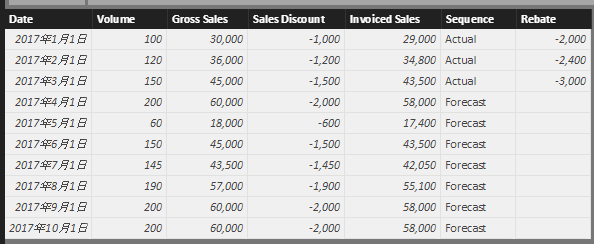
I have a sample data such as below.

When a column "Sequence" is "Actual", I have actual data in rebate column.

When a column "Sequence" is "Forecast", I do not have rebate data.


2018-02-14 14_08_33-Untitled - Power BI Desktop.png


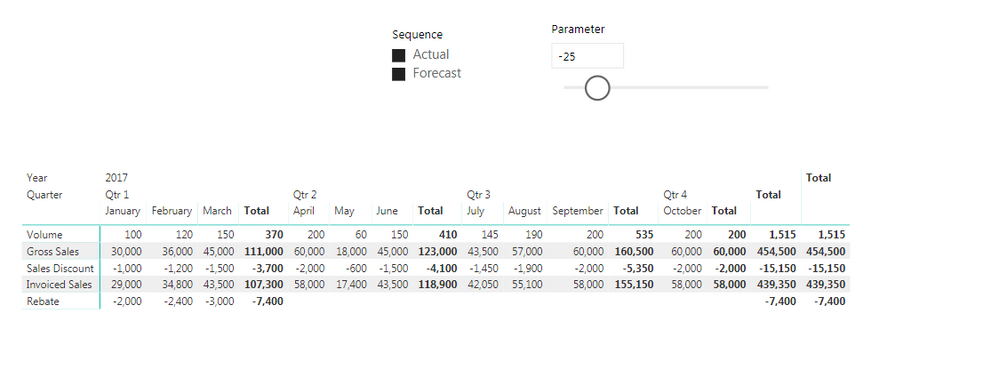
What I would like to do is to create a measure with if function and calculate function combinations to calculate rebate when "Sequence" is "Forecast"


For instance, I would like to calculate rebate as

  • if "Sequence" is "Actual", then I want a sum of rebate in the dataset.
  • if "Sequence" is "Forecast", then I want a product of Gross Sales and what-if parameter measure (in this case, -25)


2018-02-14 14_10_08-Untitled - Power BI Desktop.png

However, when I try if DAX it only recognizes a measure not a column value such as "Actual" or "Forecast"


Please find below as the sample data

Sample Data


Thank you for your support!


H


1 ACCEPTED SOLUTION
Greg_Deckler
Community Champion
Community Champion

If you are writing a measure, regardless of whether you are using an IF statement, you have to wrap any column reference in an aggregator like SUM, COUNT, MAX, MIN, etc. And, you generally need to include the table name like 'Table'[Column]. So, something like SUM('Table'[Column]).


Follow on LinkedIn
@ me in replies or I'll lose your thread!!!
Instead of a Kudo, please vote for this idea
Become an expert!: Enterprise DNA
External Tools: MSHGQM
YouTube Channel!: Microsoft Hates Greg
Latest book!:
DAX For Humans

DAX is easy, CALCULATE makes DAX hard...

View solution in original post

1 REPLY 1
Greg_Deckler
Community Champion
Community Champion

If you are writing a measure, regardless of whether you are using an IF statement, you have to wrap any column reference in an aggregator like SUM, COUNT, MAX, MIN, etc. And, you generally need to include the table name like 'Table'[Column]. So, something like SUM('Table'[Column]).


Follow on LinkedIn
@ me in replies or I'll lose your thread!!!
Instead of a Kudo, please vote for this idea
Become an expert!: Enterprise DNA
External Tools: MSHGQM
YouTube Channel!: Microsoft Hates Greg
Latest book!:
DAX For Humans

DAX is easy, CALCULATE makes DAX hard...

Helpful resources

Announcements
April Power BI Update Carousel

Power BI Monthly Update - April 2026

Check out the April 2026 Power BI update to learn about new features.

New to Fabric survey Carousel

New to Fabric Survey

If you have recently started exploring Fabric, we'd love to hear how it's going. Your feedback can help with product improvements.

Power BI DataViz World Championships carousel

Power BI DataViz World Championships - June 2026

A new Power BI DataViz World Championship is coming this June! Don't miss out on submitting your entry.

FabCon and SQLCon Highlights Carousel

FabCon & SQLCon Highlights

Experience the highlights from FabCon & SQLCon, available live and on-demand starting April 14th.