cancel
Showing results for 
Search instead for 
Did you mean: 

Learn from the best! Meet the four finalists headed to the FINALS of the Power BI Dataviz World Championships! Register now

Reply
Anonymous
Not applicable

Query vs Table as data source for report

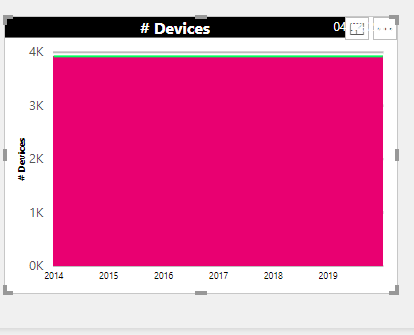
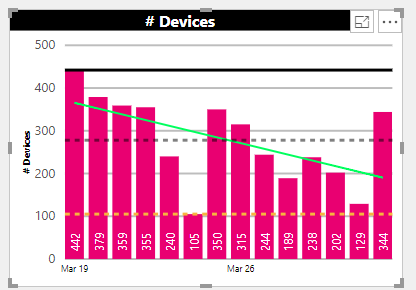
My original report was using a table as the datasource, however, I needed to change the datasource to a query.  for some reason when I used the query the report does not display correctly as a bar chart, it only displays a single bar instead of the past 14 days with of values (displaying multiple bars)  The difference in the query is that it is now contains a left join to the Current Account table.  The data source for the query is a SQl Query that limits the results based on the following query:Capture2.PNG


SELECT [DeviceID]
      ,[AccountNumber]
      ,[DeviceLabel]
      ,[DeviceFormat]
      ,[DeviceProvisioned]
      ,[DeviceReturned]
      ,a.[AzureBlobInsertDate]
  FROM [DBO].[CurrentDevices] a /*AzureProd*/
   	left join [DBO].[CurAccounts] b 
	on a.accountnumber =b.ID
WHERE (isnull(b.tags,'') not like '%test%'   
		AND isnull(b.tags, '') not like '%pqa%')   
		AND b.type='pay'   
		AND b.category='residential' 

Based on Table

Capture.PNG


Why does the Table return the correct format for the chart but the query does not?


Thanks,


Karen


2 ACCEPTED SOLUTIONS
MFelix
Super User
Super User

Hi @Anonymous ,


When changing the data source of a Power BI you need to assure that the final result is the exact same one on both source, meaning that you need to have the same column names and the same formats, on the last step of the query that way your  visuals will no be broken.


Does the change for the SQL query is giving the exact same result as the table on the query editor?


Regards,

MFelix


Regards

Miguel Félix


Did I answer your question? Mark my post as a solution!

Proud to be a Super User!

Check out my blog: Power BI em Português


View solution in original post

Anonymous
Not applicable

Thank you for your interest and input, however, the problem seemed to resolve itself, when I reverted back to an earlier version of the PBI.

View solution in original post

4 REPLIES 4
MFelix
Super User
Super User

Hi @Anonymous ,


When changing the data source of a Power BI you need to assure that the final result is the exact same one on both source, meaning that you need to have the same column names and the same formats, on the last step of the query that way your  visuals will no be broken.


Does the change for the SQL query is giving the exact same result as the table on the query editor?


Regards,

MFelix


Regards

Miguel Félix


Did I answer your question? Mark my post as a solution!

Proud to be a Super User!

Check out my blog: Power BI em Português


Anonymous
Not applicable

Thanks for the suggestion, however, both table and query contain 13 fields (some are measures), the only difference is the field names in query are different, due to I do not want to remove the table.  The function of the measure are repointed to the query name, but is the exact same as the tables.


Do you have any other suggestions?


Karen

Hi @Anonymous ,


If you have both sources on your file, then what is happening is that you are using the columns from the Table as information for the measures that are related to the query, since (i'm assuming) you don't have any relationship between both the result is the sum of all the values in the measures.


Check the Visual to see if you are picking up the columns for the axis, legend and so on from the correct source in this case the SQL query and not the Table source.


Regards

MFelix


Regards

Miguel Félix


Did I answer your question? Mark my post as a solution!

Proud to be a Super User!

Check out my blog: Power BI em Português


Anonymous
Not applicable

Thank you for your interest and input, however, the problem seemed to resolve itself, when I reverted back to an earlier version of the PBI.

Helpful resources

Announcements
Power BI DataViz World Championships carousel

Power BI DataViz World Championships - June 2026

A new Power BI DataViz World Championship is coming this June! Don't miss out on submitting your entry.

Join our Fabric User Panel

Join our Fabric User Panel

Share feedback directly with Fabric product managers, participate in targeted research studies and influence the Fabric roadmap.

March Power BI Update Carousel

Power BI Community Update - March 2026

Check out the March 2026 Power BI update to learn about new features.