
This is best Fabric, Power BI, SQL and AI community event. How do we know? The last event sold out! Save €200 with code FABCMTY200.
Register nowA new Data Days event is coming soon! This time we’re going bigger than ever. Fabric, Power BI, SQL, AI and more. Don't miss out.
Hi all, im looking to exclude a large number of text from a report (~500), some examples below. I've exceeded the amount on the basic filtering, so was looking for a query to assist or a different way.
Thanks in advance.
system-replmon
Spam Report
orion
mcafee.alerts
wsusadmin
Solved! Go to Solution.
Hi @cwstad,
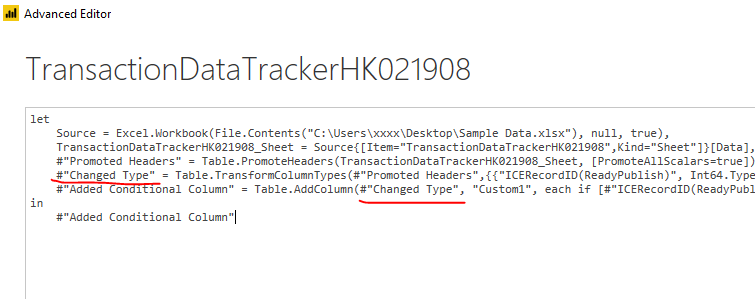
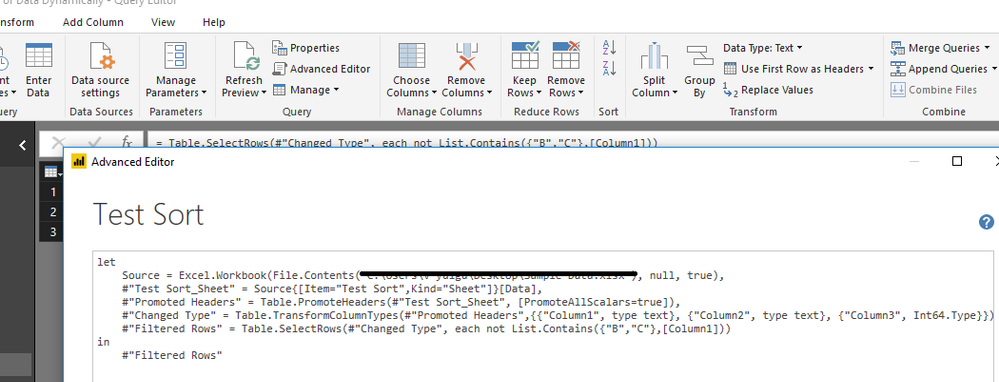
From my original post, you should replace the "#PreviousStep" with the actual step name, not the first_name.
Take below image as an example, the underlined part is the previous step.
Best regards,
Yuliana Gu
Hi @cwstad,
Please refer to this M code:
= Table.SelectRows(#"PreviousStep", each not List.Contains({"system-replmon","Spam Report","orion","mcafee.alerts","wsusadmin"},[Column1]))
Best regards,
Yuliana Gu
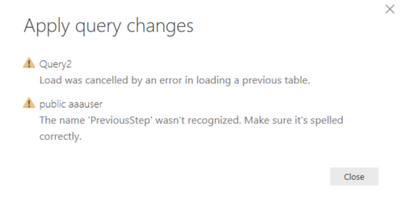
Morning i have tried to run the code but i get the following error. I have also tried to change previousstep to first_name
.
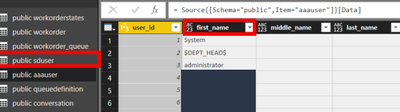
Data im trying to filter
Hi @cwstad,
From my original post, you should replace the "#PreviousStep" with the actual step name, not the first_name.
Take below image as an example, the underlined part is the previous step.
Best regards,
Yuliana Gu
Hello i'm still not getting any joy with this.
Im opening the query editor pasting
= Table.SelectRows(#"PreviousStep", each not List.Contains({"system-replmon","Spam Report","orion","mcafee.alerts","wsusadmin"},[Column1]))
Changing the #perviousstep" to the step named vavigation in the applied steps window.
However i get the error
What am i getting wrong.
Thanks
Check out the May 2026 Power BI update to learn about new features.
Sign up to receive a private message when registration opens and key events begin.
If you have recently started exploring Fabric, we'd love to hear how it's going. Your feedback can help with product improvements.
| User | Count |
|---|---|
| 28 | |
| 26 | |
| 25 | |
| 22 | |
| 13 |
| User | Count |
|---|---|
| 59 | |
| 50 | |
| 25 | |
| 20 | |
| 20 |