
cancel
Showing results for 
Search instead for 
Did you mean: 

Get Fabric certified for FREE! Don't miss your chance! Learn more

Reply
cwstad
Frequent Visitor

Query to exclude multiple items.

Hi all, im looking to exclude a large number of text from a report (~500), some examples below. I've exceeded the amount on the basic filtering, so was looking for a query to assist or a different way. 


Thanks in advance.


system-replmon
Spam Report
orion
mcafee.alerts
wsusadmin


1 ACCEPTED SOLUTION

Hi @cwstad,


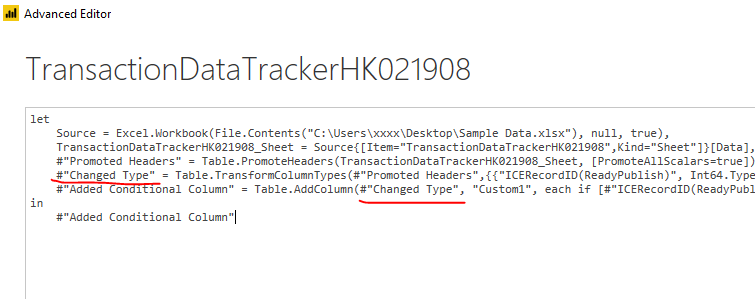
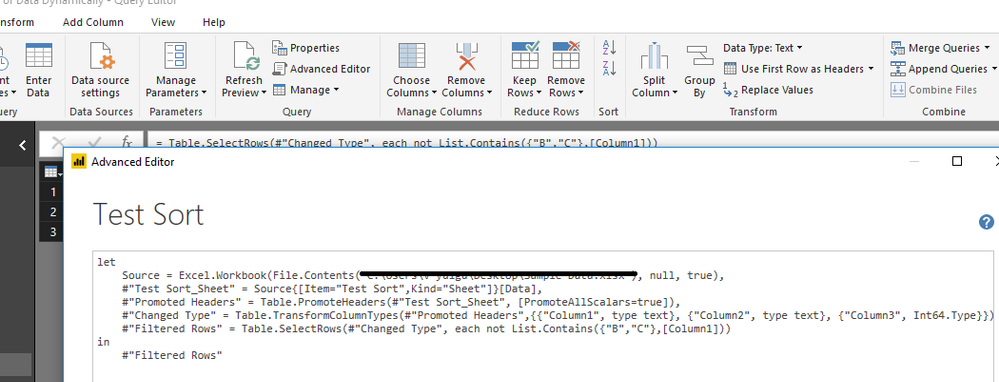
From my original post, you should replace the "#PreviousStep" with the actual step name, not the first_name.

1.PNG


Take below image as an example, the underlined part is the previous step.

2.PNG


Best regards,

Yuliana Gu

Community Support Team _ Yuliana Gu
If this post helps, then please consider Accept it as the solution to help the other members find it more quickly.

View solution in original post

4 REPLIES 4
v-yulgu-msft
Microsoft Employee
Microsoft Employee

Hi @cwstad,


Please refer to this M code:

= Table.SelectRows(#"PreviousStep", each not List.Contains({"system-replmon","Spam Report","orion","mcafee.alerts","wsusadmin"},[Column1]))

1.PNG


Best regards,

Yuliana Gu

Community Support Team _ Yuliana Gu
If this post helps, then please consider Accept it as the solution to help the other members find it more quickly.

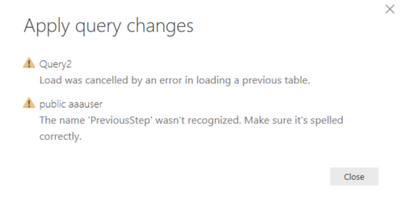
Morning i have tried to run the code but i get the following error. I have also tried to change previousstep to first_name 


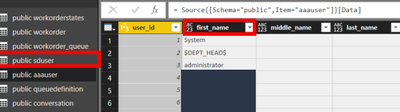
m code.pngpublic.png


Data im trying to filter

Hi @cwstad,


From my original post, you should replace the "#PreviousStep" with the actual step name, not the first_name.

1.PNG


Take below image as an example, the underlined part is the previous step.

2.PNG


Best regards,

Yuliana Gu

Community Support Team _ Yuliana Gu
If this post helps, then please consider Accept it as the solution to help the other members find it more quickly.

Hello i'm still not getting any joy with this. 


Im opening the query editor pasting


= Table.SelectRows(#"PreviousStep", each not List.Contains({"system-replmon","Spam Report","orion","mcafee.alerts","wsusadmin"},[Column1]))


Changing the #perviousstep" to the step named vavigation in the applied steps window.


However i get the error 

2018-04-06_12-07-18.png

What am i getting wrong.


Thanks

Helpful resources

Announcements
Join our Fabric User Panel

Join our Fabric User Panel

Share feedback directly with Fabric product managers, participate in targeted research studies and influence the Fabric roadmap.

FabCon Atlanta 2026 carousel

FabCon Atlanta 2026

Join us at FabCon Atlanta, March 16-20, for the ultimate Fabric, Power BI, AI and SQL community-led event. Save $200 with code FABCOMM.