Join us at FabCon Atlanta from March 16 - 20, 2026, for the ultimate Fabric, Power BI, AI and SQL community-led event. Save $200 with code FABCOMM.
Register now!The Power BI Data Visualization World Championships is back! Get ahead of the game and start preparing now! Learn more
Hi all,
I am pretty new to the PowerBI topic and already ran in to some issues.
I am trying to query a quiet large amount of data from my Log Analytics Workspace - Unfortunatley I am reaching the log analytics API limitations of 64000000 bytes for a single query.
https://dev.loganalytics.io/documentation/Using-the-API/Limits
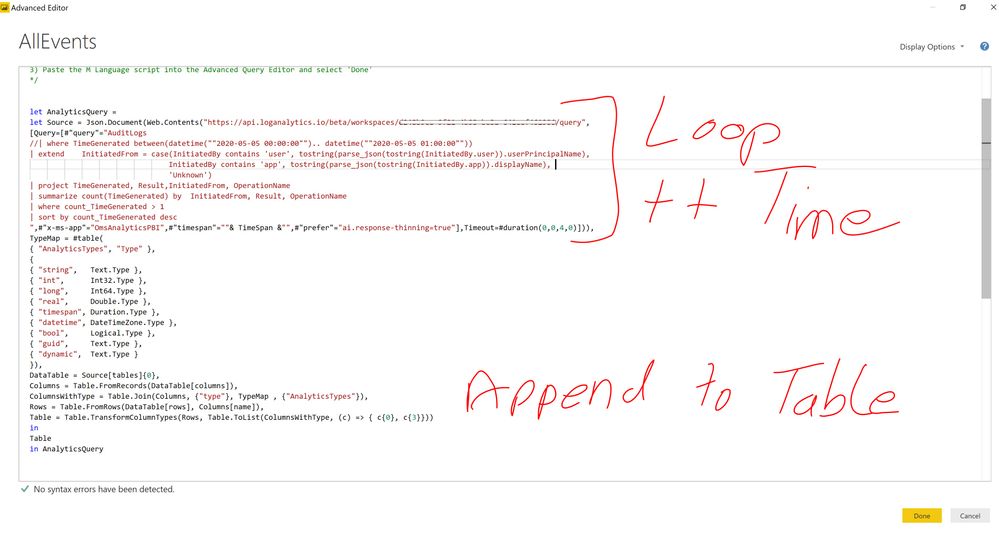
Therefore I wanted to create some kind of ForEach Loop to split my large query into smaller ones and append all the data to a new Table.
For example: If I want to query the data for the past 3 days, I would like to modify the "TimeGenerated between(.....)" Kusto expression inside the loop to query the data blockwise for maybe 4 hours and afterwards append the data to the Table. The loop should run until I queried all the data for the 3 days.
Now my questions, is this possible to do with PowerBI?
Thanks in advanced and best regards
Hi did you find a solution for this problem?
Hi @Happy_Cloud
Not quite understand your requirement, you might raise it to the support team for better advice:
https://powerbi.microsoft.com/en-us/support/
If you'd like to import the results of an Azure Monitor log query into a Power BI, you can refer to:
https://docs.microsoft.com/en-us/azure/azure-monitor/platform/powerbi
But for the 64,000,000 bytes maximum enforced by the Log Analytics API, it's also applied in power bi. you can refer to the relevant thread:
https://community.powerbi.com/t5/Desktop/Missing-data-when-querying-Log-Analytics/m-p/674109
The Power BI Data Visualization World Championships is back! Get ahead of the game and start preparing now!
| User | Count |
|---|---|
| 61 | |
| 43 | |
| 40 | |
| 38 | |
| 22 |
| User | Count |
|---|---|
| 178 | |
| 125 | |
| 116 | |
| 77 | |
| 54 |