Share feedback directly with Fabric product managers, participate in targeted research studies and influence the Fabric roadmap.
Sign up nowGet Fabric certified for FREE! Don't miss your chance! Learn more
Hi All,
I currently have two tables as per the below dataset examples;
| Task ID | Tonnage |
| 1 | 1 |
| 2 | 2 |
| 3 | 4 |
| 4 | 2 |
| 5 | 2 |
| 6 | 4 |
1st table
| Task ID | Height |
| 1 | 2 |
| 2 | 1 |
| 3 | 2 |
2nd table
Please note the 1st table with 'Tonnage' included has more 'Task ID' fields than the second table.
I am having a problem when I publish my report to the web where one visual is not working due to the 'Query being too large". I am wondering if it was possible to filter the 1st table to only show Task ID's that where included within the 2nd table as this will drastically reduce the amount of data Power BI is having to look at.
Many thanks,
E
Hi @Anonymous
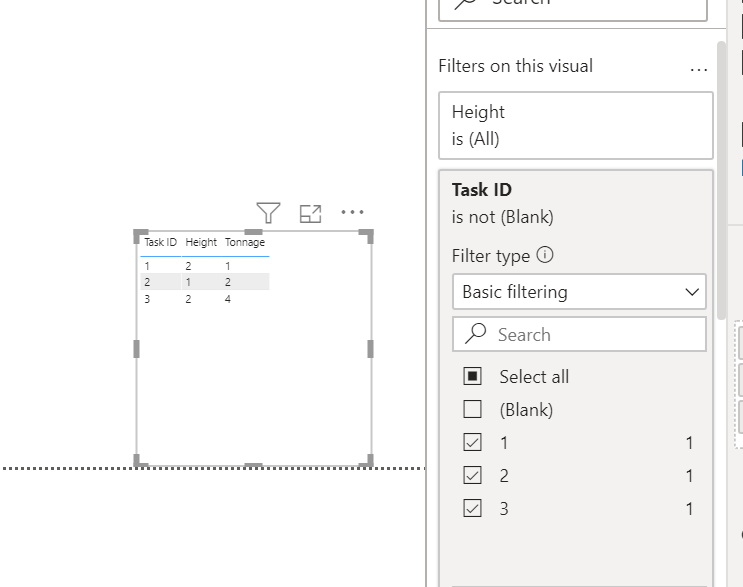
Sure just remove blanks on the visual filter like below
@Anonymous , If table 2 to has unique task ids. Then join 1 and 2 on task and take task id from 2.
try measures like
calculate(sum(table1[Tonnage]),filter(Table1, Table1[Task ID] in Values(Table2[Task ID])))
calculate(sum(table1[Tonnage]),filter(Table1, Table1[Task ID] in allselected(Table2[Task ID])))
or use treatas
https://docs.microsoft.com/en-us/dax/treatas-function
@Anonymous
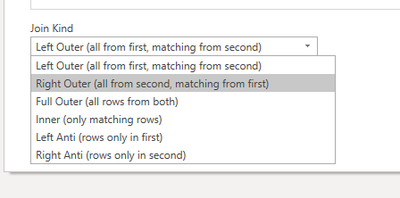
In Power Query, perform a MERGE and select RIGHT OUTER . . .
________________________
Did I answer your question? Mark this post as a solution, this will help others!.
Click on the Thumbs-Up icon if you like this reply 🙂
⭕ Subscribe and learn Power BI from these videos
⚪ Website ⚪ LinkedIn ⚪ PBI User Group
If you love stickers, then you will definitely want to check out our Community Sticker Challenge!
Check out the January 2026 Power BI update to learn about new features.
| User | Count |
|---|---|
| 61 | |
| 58 | |
| 45 | |
| 21 | |
| 18 |
| User | Count |
|---|---|
| 119 | |
| 116 | |
| 37 | |
| 34 | |
| 30 |