
cancel
Showing results for 
Search instead for 
Did you mean: 

The Power BI Data Visualization World Championships is back! Get ahead of the game and start preparing now! Learn more

Reply
Anonymous
Not applicable

Query Editor-Replace Errors in Date column with latest date

Hello,


i have a file where in one of the columns i have dates or text value "History".


What i want to do in the query editor is to replace the "History" with latest date in the column.


What i tried was :

1. Convert the column to "Date" datatype which result with the "History" cells changing to Error

2. Replacing Errors with latest value from the column.


I looked into how filtering latest date transform to code in advanced editor and came up with below:


 #"Replaced Errors" = Table.ReplaceErrorValues(#"Changed Type", let latest = List.Max(#"Changed Type"[Date when data was loaded to database]) in each {{"Date",latest}})


/


#"Replaced Errors" = Table.ReplaceErrorValues(#"Changed Type", let latest = List.Max(#"Changed Type"[Date when data was loaded to database]) in each Date.From(latest))


But they are giving error :

error.png


Can you help me with correcting it ? 


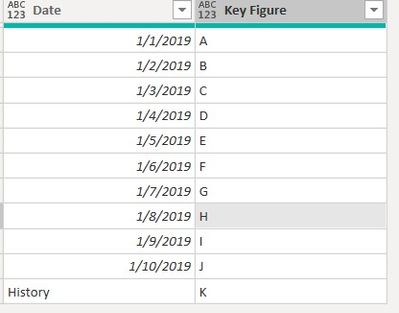
Below example dataset :

dataset.jpg

1 ACCEPTED SOLUTION

Hi @Anonymous ,

I would write it like so:


Table.ReplaceErrorValues(#"Changed Type", {{"Date", List.Max(Table.RemoveRowsWithErrors(#"Changed Type", {"Date"})[Date])}})


Imke Feldmann (The BIccountant)

If you liked my solution, please give it a thumbs up. And if I did answer your question, please mark this post as a solution. Thanks!

How to integrate M-code into your solution -- How to get your questions answered quickly -- How to provide sample data -- Check out more PBI- learning resources here -- Performance Tipps for M-queries

View solution in original post

3 REPLIES 3
Greg_Deckler
Community Champion
Community Champion

@ImkeF 


Follow on LinkedIn
@ me in replies or I'll lose your thread!!!
Instead of a Kudo, please vote for this idea
Become an expert!: Enterprise DNA
External Tools: MSHGQM
YouTube Channel!: Microsoft Hates Greg
Latest book!:
DAX For Humans

DAX is easy, CALCULATE makes DAX hard...

Hi @Anonymous ,

I would write it like so:


Table.ReplaceErrorValues(#"Changed Type", {{"Date", List.Max(Table.RemoveRowsWithErrors(#"Changed Type", {"Date"})[Date])}})


Imke Feldmann (The BIccountant)

If you liked my solution, please give it a thumbs up. And if I did answer your question, please mark this post as a solution. Thanks!

How to integrate M-code into your solution -- How to get your questions answered quickly -- How to provide sample data -- Check out more PBI- learning resources here -- Performance Tipps for M-queries

Anonymous
Not applicable

Works, thank you for your support ! 

Helpful resources

Announcements
Power BI DataViz World Championships

Power BI Dataviz World Championships

The Power BI Data Visualization World Championships is back! Get ahead of the game and start preparing now!

November Power BI Update Carousel

Power BI Monthly Update - November 2025

Check out the November 2025 Power BI update to learn about new features.

FabCon Atlanta 2026 carousel

FabCon Atlanta 2026

Join us at FabCon Atlanta, March 16-20, for the ultimate Fabric, Power BI, AI and SQL community-led event. Save $200 with code FABCOMM.