
Join us at FabCon Atlanta from March 16 - 20, 2026, for the ultimate Fabric, Power BI, AI and SQL community-led event. Save $200 with code FABCOMM.
Register now!View all the Fabric Data Days sessions on demand. View schedule
Hello,
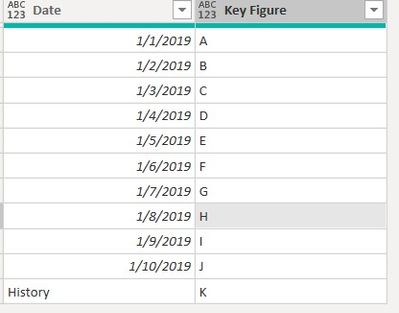
i have a file where in one of the columns i have dates or text value "History".
What i want to do in the query editor is to replace the "History" with latest date in the column.
What i tried was :
1. Convert the column to "Date" datatype which result with the "History" cells changing to Error
2. Replacing Errors with latest value from the column.
I looked into how filtering latest date transform to code in advanced editor and came up with below:
#"Replaced Errors" = Table.ReplaceErrorValues(#"Changed Type", let latest = List.Max(#"Changed Type"[Date when data was loaded to database]) in each {{"Date",latest}})
/
#"Replaced Errors" = Table.ReplaceErrorValues(#"Changed Type", let latest = List.Max(#"Changed Type"[Date when data was loaded to database]) in each Date.From(latest))
But they are giving error :
Can you help me with correcting it ?
Below example dataset :
Solved! Go to Solution.
Hi @Anonymous ,
I would write it like so:
Table.ReplaceErrorValues(#"Changed Type", {{"Date", List.Max(Table.RemoveRowsWithErrors(#"Changed Type", {"Date"})[Date])}})
Imke Feldmann (The BIccountant)
If you liked my solution, please give it a thumbs up. And if I did answer your question, please mark this post as a solution. Thanks!
How to integrate M-code into your solution -- How to get your questions answered quickly -- How to provide sample data -- Check out more PBI- learning resources here -- Performance Tipps for M-queries
Hi @Anonymous ,
I would write it like so:
Table.ReplaceErrorValues(#"Changed Type", {{"Date", List.Max(Table.RemoveRowsWithErrors(#"Changed Type", {"Date"})[Date])}})
Imke Feldmann (The BIccountant)
If you liked my solution, please give it a thumbs up. And if I did answer your question, please mark this post as a solution. Thanks!
How to integrate M-code into your solution -- How to get your questions answered quickly -- How to provide sample data -- Check out more PBI- learning resources here -- Performance Tipps for M-queries
Works, thank you for your support !
Check out the November 2025 Power BI update to learn about new features.
Advance your Data & AI career with 50 days of live learning, contests, hands-on challenges, study groups & certifications and more!