Join us at FabCon Atlanta from March 16 - 20, 2026, for the ultimate Fabric, Power BI, AI and SQL community-led event. Save $200 with code FABCOMM.
Register now!The Power BI Data Visualization World Championships is back! Get ahead of the game and start preparing now! Learn more
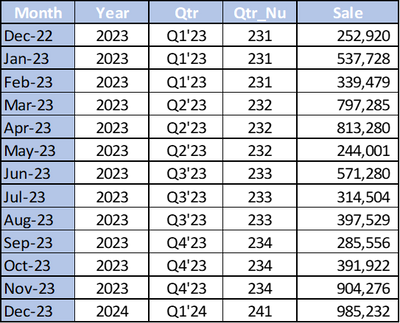
I have a data set as show below.
I have a month dorpdown filter. When we select a month, i need the QTR for that month and the previous QTR in cards. and in another 2 card i need to show the total sales based on that.
For example if i select Apr-23 in the dropdown filter in one card i need to show Q2'23 and in another card it show show Q1'23. How can i creat a measure for this. For selected month QTR i am able to show. But previous QTR based on the selcted month i am not able to create.
I need help to create a measre for displaying the previous QTR based on the month selectd and in another card i need to show the total sales of the last month of previous QTR.
As per the example i need to get Q1'23 in one card and in another i need to see 339479 ( which is the last month of Q1'23).
Please help me on this.
Solved! Go to Solution.
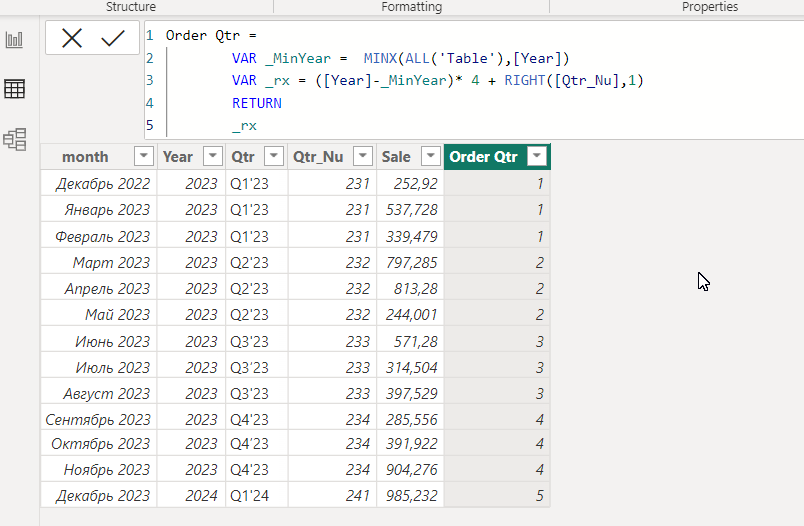
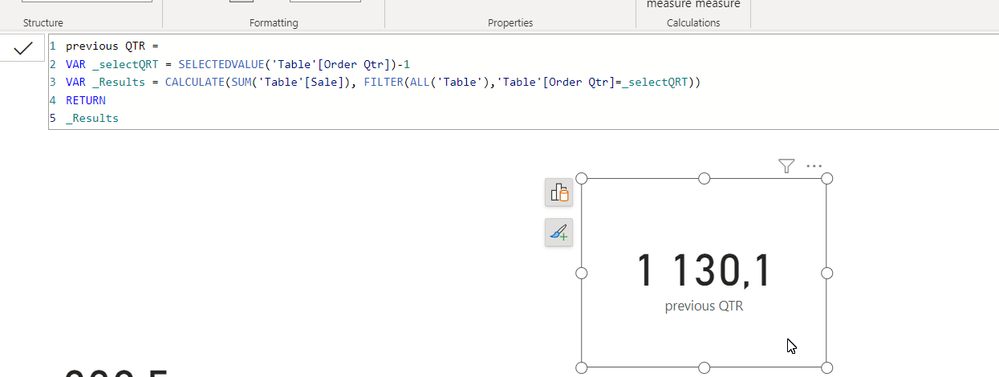
pls try this
Current Qtr = SELECTEDVALUE('Table'[Qtr])
-----
Last QTR =
VAR _selectQRT = SELECTEDVALUE('Table'[Order Qtr])-1
VAR _lastMonth = MAXX(FILTER(ALL('Table'),'Table'[Order Qtr]=_selectQRT),[Qtr])
RETURN
_lastMonth
Based on your description, I created data to reproduce your scenario. The pbix file is attached in the end.
https://1drv.ms/u/s!AiUZ0Ws7G26RiF8BOplXRoeii7tI?e=mdsni5
@Ahmedx thanks for your qucik response. can you tell me how can i show the Quater name in a card. for example when i select April -23 the one card should show Q2'23 & in another card it should show the previous quarter as Q1'23.how can we do this.
pls try this
Current Qtr = SELECTEDVALUE('Table'[Qtr])
-----
Last QTR =
VAR _selectQRT = SELECTEDVALUE('Table'[Order Qtr])-1
VAR _lastMonth = MAXX(FILTER(ALL('Table'),'Table'[Order Qtr]=_selectQRT),[Qtr])
RETURN
_lastMonth
The Power BI Data Visualization World Championships is back! Get ahead of the game and start preparing now!
| User | Count |
|---|---|
| 39 | |
| 36 | |
| 33 | |
| 31 | |
| 28 |
| User | Count |
|---|---|
| 128 | |
| 88 | |
| 79 | |
| 68 | |
| 63 |