cancel
Showing results for 
Search instead for 
Did you mean: 

The Power BI Data Visualization World Championships is back! Get ahead of the game and start preparing now! Learn more

Reply
Chollid1
Frequent Visitor

QUERY EDITOR (Not Desktop) Replacing cell counts with Cumulative Totals

I originally wanted to know how to create a calculated column to accomplish this. I was given the following code and it worked in desktop mode but not in the query editor.


Running = SUMX(
                             FILTER(VerbalComplaints,
                                            VerbalComplaints[Day]<=EARLIER(VerbalComplaints[Day])
                                        ),
                             VerbalComplaints[June]).


As far as I can tell the query editor does not recognize DAX functions like SUMX and EARLIER.


My end goal is for this to automatically update a Trend graph. That looks similar to this:
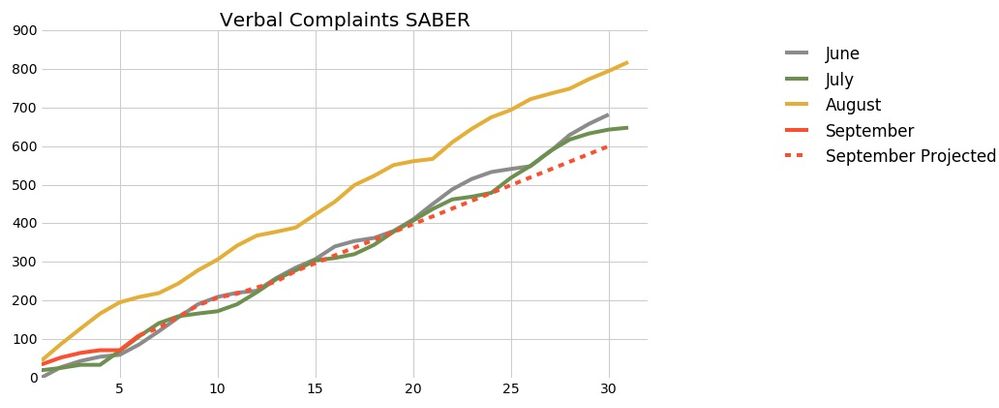
 

trend graph.jpg

Currently my table (query) looks like this in the Query Editor and I need to replace the contents in the cells with cumulative totals for any column not named Day. I have no idea where to start. If I can complete this last step then the query will produce the data ready to go for the trend graph. I believe I need to have the data fully ready in the query editor to be able to automate. Below is a graphic of my table.
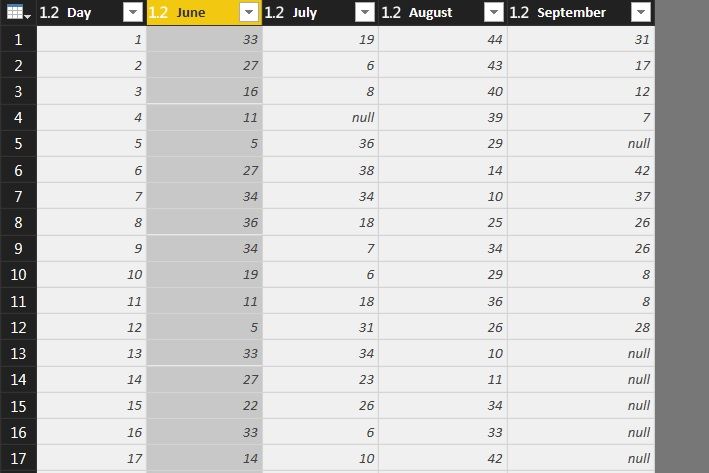
 

VerbalComplaintsTable.jpg


I don't think I can just create a new column and replace.... I literally need to replace the cells populated with daily counts with the cumulative totals. This way my query always pulls in the proper months and names the columns correctly thanks to the pivot I use to create data currently in this table (query).

3 REPLIES 3
Greg_Deckler
Community Champion
Community Champion

You are correct, Query Editor uses Power Query "M" Language which is entirely different that the DAX language used in "Desktop".


https://msdn.microsoft.com/en-us/library/mt211003.aspx


And, as it turns out, not NEARLY as easy to do in M as in DAX:


http://www.excelguru.ca/blog/2015/03/31/create-running-totals-in-power-query/


Follow on LinkedIn
@ me in replies or I'll lose your thread!!!
Instead of a Kudo, please vote for this idea
Become an expert!: Enterprise DNA
External Tools: MSHGQM
YouTube Channel!: Microsoft Hates Greg
Latest book!:
DAX For Humans

DAX is easy, CALCULATE makes DAX hard...

Thanks for clearing that up. Im going to give this a shot. I've never used the M language before.

I read the article but I still have no idea how to write this in M language in the query editor... im so new to this and I haven't used power pivot either. Im still very confused.

Helpful resources

Announcements
Power BI DataViz World Championships

Power BI Dataviz World Championships

The Power BI Data Visualization World Championships is back! Get ahead of the game and start preparing now!

December 2025 Power BI Update Carousel

Power BI Monthly Update - December 2025

Check out the December 2025 Power BI Holiday Recap!

FabCon Atlanta 2026 carousel

FabCon Atlanta 2026

Join us at FabCon Atlanta, March 16-20, for the ultimate Fabric, Power BI, AI and SQL community-led event. Save $200 with code FABCOMM.