Get Fabric or SQL Certified for Free.
Get certified for free when you join Fabric Data Days 2026 and dive into Fabric, Power BI, SQL, AI, and other essential data skills.
Join now- Power BI forums
- Get Help with Power BI
- Desktop
- Service
- Report Server
- Power Query
- Mobile Apps
- Developer
- DAX Commands and Tips
- Custom Visuals Development Discussion
- Health and Life Sciences
- Power BI Spanish forums
- Translated Spanish Desktop
- Training and Consulting
- Instructor Led Training
- Dashboard in a Day for Women, by Women
- Galleries
- Data Stories Gallery
- Themes Gallery
- Contests Gallery
- QuickViz Gallery
- Quick Measures Gallery
- Visual Calculations Gallery
- Fabric Apps Gallery
- Notebook Gallery
- Translytical Task Flow Gallery
- TMDL Gallery
- R Script Showcase
- Webinars and Video Gallery
- Ideas
- Custom Visuals Ideas (read-only)
- Issues
- Issues
- Events
- Upcoming Events
July 28 - August 9 | Final Round of the Power BI Dataviz World Championships. This is your chance. Learn more
- Power BI forums
- Forums
- Get Help with Power BI
- Desktop
- Python script error:"the preview for section 1/que...
- Subscribe to RSS Feed
- Mark Topic as New
- Mark Topic as Read
- Float this Topic for Current User
- Bookmark
- Subscribe
- Printer Friendly Page

- Mark as New
- Bookmark
- Subscribe
- Mute
- Subscribe to RSS Feed
- Permalink
- Report Inappropriate Content
Python script error:"the preview for section 1/query1/source doesn't exist"
Hi,
When I tryto run this simple python script in power bi it throws this error " the preview for section 1/query1/source doesn't exist"
data = [['Alex',10],['Bob',12],['Clarke',13]]
df = pd.DataFrame(data,columns=['Name','Age'],dtype=float)
print (df)
Solved! Go to Solution.


- Mark as New
- Bookmark
- Subscribe
- Mute
- Subscribe to RSS Feed
- Permalink
- Report Inappropriate Content
Hi @ahmedidris ,
I am asssuming that you are following the below link to run this pythin script:
https://docs.microsoft.com/en-us/power-bi/connect-data/desktop-python-scripts
I tried doing same and I can successfully run the script in python editor:
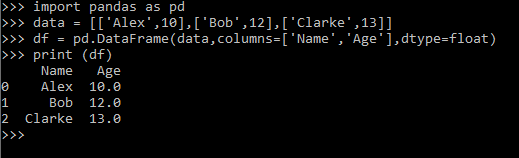
Also, make sure your Python home directory path is defined correctly in Power BI Desktop:

Thanks,
Pragati


- Mark as New
- Bookmark
- Subscribe
- Mute
- Subscribe to RSS Feed
- Permalink
- Report Inappropriate Content
Hello everyone, Have you managed to solve your issue?
I face exactly the same error message "the preview for section 1/query1/source doesn't exist" when using a R script:
R script works in RStudio and other Rscript works in the same pbix (therefore link to R work well).
Here is the R script reading from Humanitarian Data Exchange package rhdx:
library(rhdx)
library(tidyverse)
library(stringr)
library(dplyr)
dataset<-search_datasets("INFORM Country Risk Profiles", rows = 3)
ds<-get_resources(nth(dataset,1))
nb_ds<-length(ds)
Hazards<- vector("list", length = nb_ds)
var_interes<-c("COUNTRY","Iso3","Physical exposure to earthquake","Physical exposure to flood","Physical exposure to tsunami","Physical exposure to tropical cyclone","Droughts probability and historical impact","Physical exposure to epidemics","INFORM Natural Hazard","GCRI Internal Conflict Score","Current Highly Violent Conflict Intensity Score","INFORM Human Hazard")
for (i in 1:nb_ds){
Hazards[[i]]=read_resource(ds[i][[1]],sheet="Hazard & Exposure")
for (j in names(Hazards[[i]])){
if (!(j %in% var_interes)){
Hazards[[i]]<-Hazards[[i]][-c(which( colnames(Hazards[[i]])==j ))]
}
}
Hazards[[i]]$name_ds<-ds[i][[1]][["data"]][["name"]]
Hazards[[i]]$desc_ds<-ds[i][[1]][["data"]][["description"]]
Hazards[[i]]$format_ds<-ds[i][[1]][["data"]][["format"]]
Hazards[[i]]$Index<-i
}
INFORM_RISK_Hazard<-do.call(bind_rows,Hazards)
INFORM_RISK_Hazard

- Mark as New
- Bookmark
- Subscribe
- Mute
- Subscribe to RSS Feed
- Permalink
- Report Inappropriate Content
@ahmedidris , refer if these can help
Python
https://docs.microsoft.com/en-us/power-bi/connect-data/desktop-python-scripts
https://en.blog.businessdecision.com/how-to-use-the-python-integrator-in-powerbi/
https://towardsdatascience.com/using-python-in-power-bi-ee95a6b71443
https://powerbi.microsoft.com/en-us/blog/python-visualizations-in-power-bi-service/

- Mark as New
- Bookmark
- Subscribe
- Mute
- Subscribe to RSS Feed
- Permalink
- Report Inappropriate Content
Hi @ahmedidris ,
Can you show the M code?
I tried blank query, it worked well
- Mark as New
- Bookmark
- Subscribe
- Mute
- Subscribe to RSS Feed
- Permalink
- Report Inappropriate Content
Hi @ahmedidris ,
I am asssuming that you are following the below link to run this pythin script:
https://docs.microsoft.com/en-us/power-bi/connect-data/desktop-python-scripts
I tried doing same and I can successfully run the script in python editor:
Also, make sure your Python home directory path is defined correctly in Power BI Desktop:
Thanks,
Pragati
- Mark as New
- Bookmark
- Subscribe
- Mute
- Subscribe to RSS Feed
- Permalink
- Report Inappropriate Content
Hi Pragati,
I tried the steps mentioned by you but still I am getting the same error. Is there anything else which needs to be done
- Mark as New
- Bookmark
- Subscribe
- Mute
- Subscribe to RSS Feed
- Permalink
- Report Inappropriate Content
Hi, I also faced this error when trying to connect my python script to power bi, while the python script works well by itself. I fixed the connection error by simplifying my script, e.g. reducing the number of function within a function, avoiding complex calculations. I just keep trial and error until my script is 'simple' enough for power bi to process it.
Helpful resources

Fabric Community Sticker Challenge - Barcelona 2026
If you love stickers, then you will definitely want to check out our community sticker challenge, Barcelona edition!

Power BI Monthly Update - July 2026
Check out the July 2026 Power BI update to learn about new features.

Power BI DataViz World Championships - June 2026
A new Power BI DataViz World Championship is coming this June! Don't miss out on submitting your entry.

| User | Count |
|---|---|
| 26 | |
| 22 | |
| 22 | |
| 20 | |
| 17 |


| User | Count |
|---|---|
| 35 | |
| 29 | |
| 21 | |
| 19 | |
| 17 |


