cancel
Showing results for 
Search instead for 
Did you mean: 

Learn from the best! Meet the four finalists headed to the FINALS of the Power BI Dataviz World Championships! Register now

Reply
niyati_61
Helper III
Helper III

Python Visual Scatter Plot

Hello all,


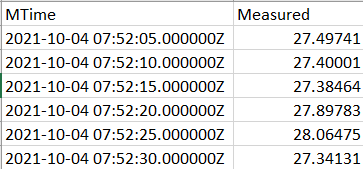
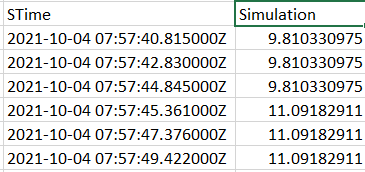
Currently I'm working with CSV data, 2 Files as shown below, 

Measured Data

niyati_61_1-1636802085547.png


Simulation Data

niyati_61_2-1636802141060.png


I want to make a scatter plot chart using a power bi visual. 

Imp Note: The measured CSV File has around 8k rows,

and the simulation CSV File has around 1.5k rows.


They are not plotted against the same exact times. The reason why Simulation has less points is that, once the Measured is marked on the chart, the simulation data points cover from the beginning to the end like overall.


So bascially for both of these, we need to use all the 4 axes.


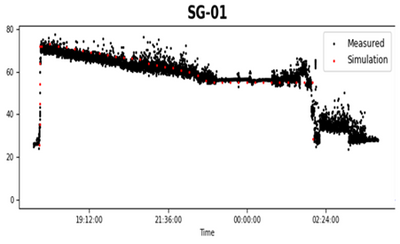
This is what I want, 

niyati_61_0-1636802933987.png


I tried it in Power BI, I can get the Measured points in one chart, and similarly Simulation points in another chart. 

But, how do I combine the 2 together in one chart like this one?


Kindly require your assistance asap. Thank you in advance!

2 REPLIES 2
niyati_61
Helper III
Helper III

Hello,


How do you make a Scatter plot graph like this with 2 data points (Measured and Simulation) in Power BI?

I have used the Python Visual. But so far have only made the Measured (Black data points). How do you do it with another set of data points? Do we have to overlap 2 graphs on each other? 

niyati_61_0-1636862726065.png


Thank you!


Anonymous
Not applicable

Hi @niyati_61 ,


The default scatter plot chart does not support your needs. You could check if Microsoft AppSource has the view you need.

If not, you will need to develop custom visual.


Best Regards,

Jay

Helpful resources

Announcements
Join our Fabric User Panel

Join our Fabric User Panel

Share feedback directly with Fabric product managers, participate in targeted research studies and influence the Fabric roadmap.

March Power BI Update Carousel

Power BI Community Update - March 2026

Check out the March 2026 Power BI update to learn about new features.