cancel
Showing results for 
Search instead for 
Did you mean: 

The Power BI Data Visualization World Championships is back! Get ahead of the game and start preparing now! Learn more

Reply
Marudi
Regular Visitor

Put dates on Y axis

Hi,


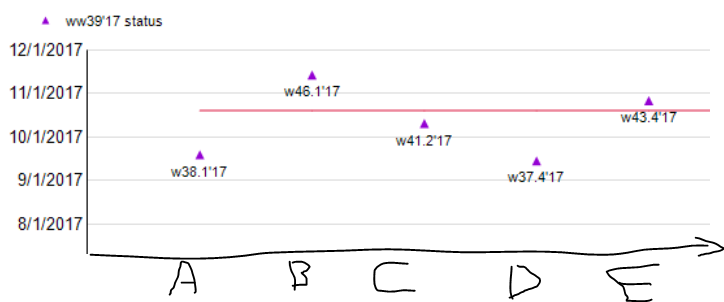
I using MS project data and want to create a chart that for each task ( X-axis) i will see it finish date (Y-axis).


The goal is to see which of my features is late to the project finish date.

I already got the table and data ready but I cant present the date


like the sample below:

for each task A to E we can see the finish date 

The red line is my deadline 

image.png.


2 REPLIES 2
Eric_Zhang
Microsoft Employee
Microsoft Employee


@Marudi wrote:

Hi,


I using MS project data and want to create a chart that for each task ( X-axis) i will see it finish date (Y-axis).


The goal is to see which of my features is late to the project finish date.

I already got the table and data ready but I cant present the date


like the sample below:

for each task A to E we can see the finish date 

The red line is my deadline 

image.png.


@Marudi

AFAIK, it is not possible to get a similar visual in your post. For project management, you can check the Gantt visual.

Thanks,

The Gantt chart really nice and look good the only problem I cant add a deadline in it and

I would prefer the dates in WorkWeeks is it possible ? 

Helpful resources

Announcements
November Power BI Update Carousel

Power BI Monthly Update - November 2025

Check out the November 2025 Power BI update to learn about new features.

Fabric Data Days Carousel

Fabric Data Days

Advance your Data & AI career with 50 days of live learning, contests, hands-on challenges, study groups & certifications and more!

FabCon Atlanta 2026 carousel

FabCon Atlanta 2026

Join us at FabCon Atlanta, March 16-20, for the ultimate Fabric, Power BI, AI and SQL community-led event. Save $200 with code FABCOMM.

Top Kudoed Authors