This time we’re going bigger than ever. Fabric, Power BI, SQL, AI and more. We're covering it all. You won't want to miss it.
Learn moreLevel up your Power BI skills this month - build one visual each week and tell better stories with data! Get started
Hello,
I am trying to understand how I might be able to visualize punch data on an area chart but automate the calculation in DAX or M. Ultimately, I want this data on an area chart with time on the time of day on the X-axis and count of working employees on the Y-axis (I will be plotting this data along with 15-minute interval PoS transaction data too).
I have done this in the past in a manual way by listing out all of the times of the day (in 15-minute increments) and placing a "1" for each count of employees working during that 15-minute interval. My question is, is there a way to write DAX or M to get the raw data so that the area chart can consume and plot this data?
Raw Data:
| Employee ID | Punch Start | Punch End | Break Start | Break End |
| 1234 | 9:15 am | 5:00 pm | 12:30 pm | 1 pm |
| 1235 | 9 am | 4 pm | null | null |
| 1236 | 8 am | 3 pm | 11 am | 11:30 am |
Manual Example:
| Employee ID | 8 | 8:15 | 8:30 | 8:45 | 9:00 | 9:15 | 9:30 | 9:45 | 10 |
| 1234 | 1 | 1 | 1 | 1 | |||||
| 1235 | 1 | 1 | 1 | 1 | 1 | ||||
| 1236 | 1 | 1 | 1 | 1 | 1 | 1 | 1 | 1 | 1 |
Solved! Go to Solution.
HI @krscott409,
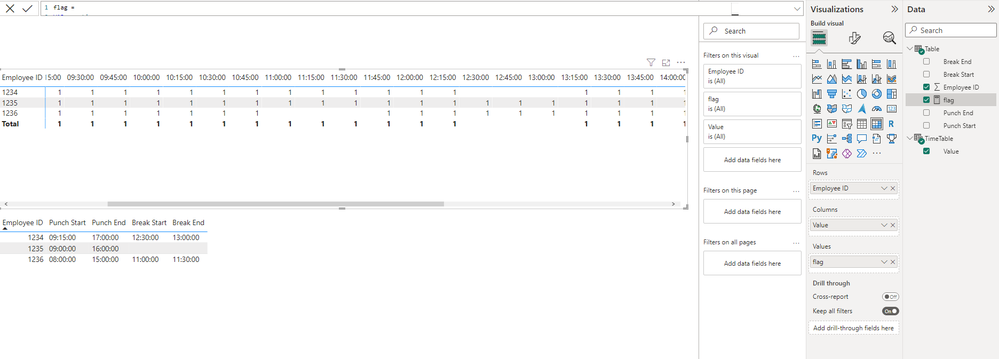
You can create a new time table with fifteen minute as interval, and use its time field with raw table employee field to create a matrix.(time to column, employee to row)
After these steps, you can write a measure formula to lookup raw table records based on the current employee and corresponding time values to return flag and use on matrix value field.
Regards,
Xiaoxin Sheng
HI @krscott409,
You can create a new time table with fifteen minute as interval, and use its time field with raw table employee field to create a matrix.(time to column, employee to row)
After these steps, you can write a measure formula to lookup raw table records based on the current employee and corresponding time values to return flag and use on matrix value field.
Regards,
Xiaoxin Sheng
Check out the April 2026 Power BI update to learn about new features.
Sign up to receive a private message when registration opens and key events begin.
If you have recently started exploring Fabric, we'd love to hear how it's going. Your feedback can help with product improvements.
| User | Count |
|---|---|
| 30 | |
| 24 | |
| 23 | |
| 17 | |
| 15 |
| User | Count |
|---|---|
| 63 | |
| 36 | |
| 30 | |
| 23 | |
| 22 |