Learn from the best! Meet the four finalists headed to the FINALS of the Power BI Dataviz World Championships! Register now
Hello,
I am trying to understand how I might be able to visualize punch data on an area chart but automate the calculation in DAX or M. Ultimately, I want this data on an area chart with time on the time of day on the X-axis and count of working employees on the Y-axis (I will be plotting this data along with 15-minute interval PoS transaction data too).
I have done this in the past in a manual way by listing out all of the times of the day (in 15-minute increments) and placing a "1" for each count of employees working during that 15-minute interval. My question is, is there a way to write DAX or M to get the raw data so that the area chart can consume and plot this data?
Raw Data:
| Employee ID | Punch Start | Punch End | Break Start | Break End |
| 1234 | 9:15 am | 5:00 pm | 12:30 pm | 1 pm |
| 1235 | 9 am | 4 pm | null | null |
| 1236 | 8 am | 3 pm | 11 am | 11:30 am |
Manual Example:
| Employee ID | 8 | 8:15 | 8:30 | 8:45 | 9:00 | 9:15 | 9:30 | 9:45 | 10 |
| 1234 | 1 | 1 | 1 | 1 | |||||
| 1235 | 1 | 1 | 1 | 1 | 1 | ||||
| 1236 | 1 | 1 | 1 | 1 | 1 | 1 | 1 | 1 | 1 |
Solved! Go to Solution.
HI @krscott409,
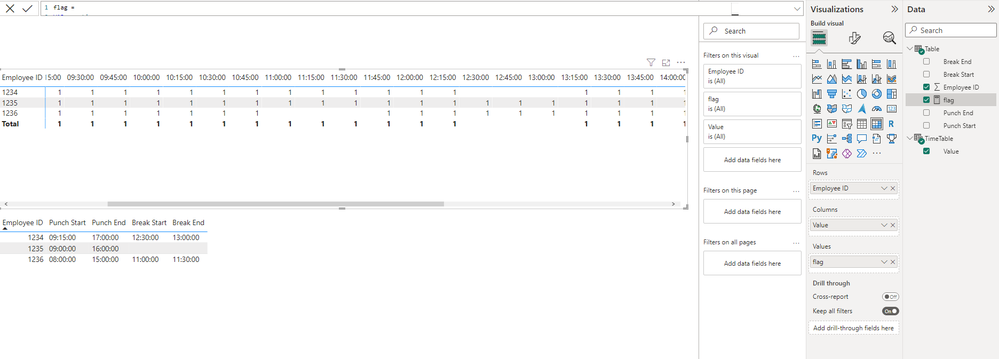
You can create a new time table with fifteen minute as interval, and use its time field with raw table employee field to create a matrix.(time to column, employee to row)
After these steps, you can write a measure formula to lookup raw table records based on the current employee and corresponding time values to return flag and use on matrix value field.
Regards,
Xiaoxin Sheng
HI @krscott409,
You can create a new time table with fifteen minute as interval, and use its time field with raw table employee field to create a matrix.(time to column, employee to row)
After these steps, you can write a measure formula to lookup raw table records based on the current employee and corresponding time values to return flag and use on matrix value field.
Regards,
Xiaoxin Sheng
| User | Count |
|---|---|
| 59 | |
| 46 | |
| 31 | |
| 17 | |
| 16 |
| User | Count |
|---|---|
| 79 | |
| 68 | |
| 43 | |
| 26 | |
| 23 |