Share feedback directly with Fabric product managers, participate in targeted research studies and influence the Fabric roadmap.
Sign up nowGet Fabric certified for FREE! Don't miss your chance! Learn more
Hi All,
I have a report contains following FY matrices
Now I want to calculate projceted value as:
At this time the value provided for March is not complete, therefore do not include it.
2. Divide result by the number of full months completed a) In this case there were 3 months completed, Jan, Feb & Mar. b)244 / 2 = 122 ç this gives you the Average/Month
3. Multiple by 6 months to determine the Total Projected Sum for that period. a)122 * 6 = 732 ç Gives you the Total Projected Sum
To determine what the projected percentage is of 2nd half of the fiscal year when compared to the 1st half of the fiscal year:
Total % Project Cost is 77.21 %
100-77.21 = 22.79 % is Projected Percent Reduction
Help will be appreciated. Thanks
Solved! Go to Solution.
Hi @sdhn ,
I have added a FY Flag column to table for the convenience:
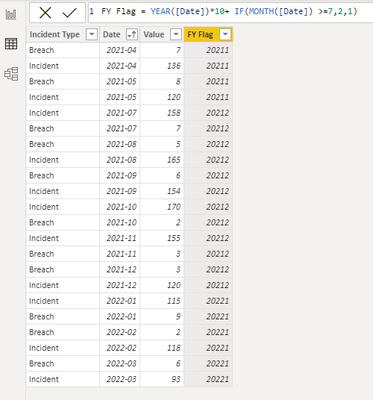
And firstly create a measure to get the current FY period (Current is 2022-March, so the FY period I set is 20221)
CurrFY = YEAR(TODAY())*10+IF(MONTH(TODAY())>=7,2,1)
Then please create measures:
Measure 1 = CALCULATE(SUM('Table'[Value]),FILTER('Table',[FY Flag]=[CurrFY] && MONTH([Date])<MONTH(TODAY())))Measure 2 = CALCULATE(SUM('Table'[Value]) / DISTINCTCOUNT('Table'[Date].[MonthNo]),FILTER('Table',[FY Flag]=[CurrFY] && MONTH([Date])<MONTH(TODAY())))Measure 3 = [Measure 2] * 6Measure 4 =
var _sumLastHalf=CALCULATE(SUM('Table'[Value]),FILTER('Table',[FY Flag]= MAXX(FILTER(ALL('Table'),[FY Flag]<[CurrFY]),[FY Flag])))
return [Measure 3] / _sumLastHalfMeasure 5 = 1-[Measure 4]
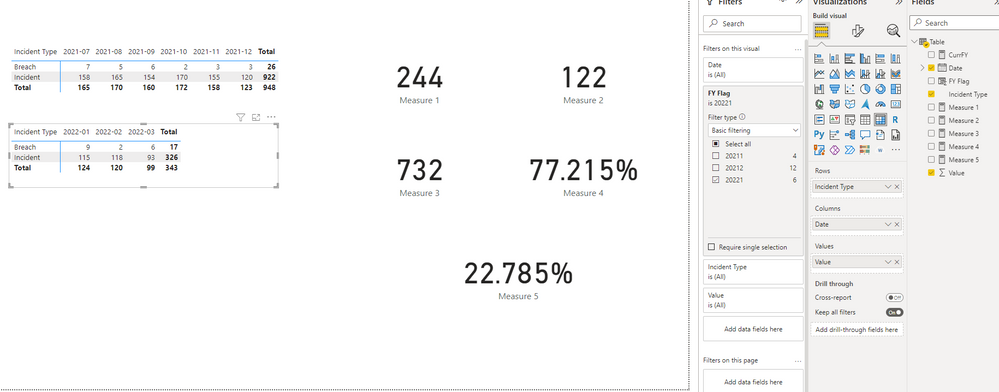
Output:
Best Regards,
Eyelyn Qin
If this post helps, then please consider Accept it as the solution to help the other members find it more quickly.
Hi @sdhn ,
1. I used Year*10 and the to make the year to the "front",so the format will be yyyyX.
Like, if I use Year*100 + Month Number , the format will be yyyyMM. (202203=2022 March, 202211= 2022 November)
2. For X, from your description, one year is divided to two parts ( half of the fiscal year)——
First half: January to June
Second half:July to December
So I used if Month() >=7 then set 2 otherwise set 1. 2 means the second half ,1 means the first half.
The final format of flag column will be yyyyX= 20221, 20222
3. No.You don't need to manaully change it. I have used DAX to dynamically get the Flag.
Hope my explanation could make it clear to you.😀
Best Regards,
Eyelyn Qin
If this post helps, then please consider Accept it as the solution to help the other members find it more quickly.
Hi Eyelyn
Thansk for your nice reply.
I have few questions:
Hi @sdhn ,
I have added a FY Flag column to table for the convenience:
And firstly create a measure to get the current FY period (Current is 2022-March, so the FY period I set is 20221)
CurrFY = YEAR(TODAY())*10+IF(MONTH(TODAY())>=7,2,1)
Then please create measures:
Measure 1 = CALCULATE(SUM('Table'[Value]),FILTER('Table',[FY Flag]=[CurrFY] && MONTH([Date])<MONTH(TODAY())))Measure 2 = CALCULATE(SUM('Table'[Value]) / DISTINCTCOUNT('Table'[Date].[MonthNo]),FILTER('Table',[FY Flag]=[CurrFY] && MONTH([Date])<MONTH(TODAY())))Measure 3 = [Measure 2] * 6Measure 4 =
var _sumLastHalf=CALCULATE(SUM('Table'[Value]),FILTER('Table',[FY Flag]= MAXX(FILTER(ALL('Table'),[FY Flag]<[CurrFY]),[FY Flag])))
return [Measure 3] / _sumLastHalfMeasure 5 = 1-[Measure 4]
Output:
Best Regards,
Eyelyn Qin
If this post helps, then please consider Accept it as the solution to help the other members find it more quickly.

If you love stickers, then you will definitely want to check out our Community Sticker Challenge!
Check out the January 2026 Power BI update to learn about new features.
| User | Count |
|---|---|
| 64 | |
| 63 | |
| 48 | |
| 21 | |
| 18 |
| User | Count |
|---|---|
| 119 | |
| 116 | |
| 38 | |
| 36 | |
| 27 |