Join us at FabCon Atlanta from March 16 - 20, 2026, for the ultimate Fabric, Power BI, AI and SQL community-led event. Save $200 with code FABCOMM.
Register now!The Power BI Data Visualization World Championships is back! It's time to submit your entry. Live now!
Hello,
I have data for 24 different projects. I have the resource name and project title. This is from an excel file.
Is ther a way to create a view where I can pull one project and see the resources assigned to that one project and also see where those resources are also allocated? In one view.
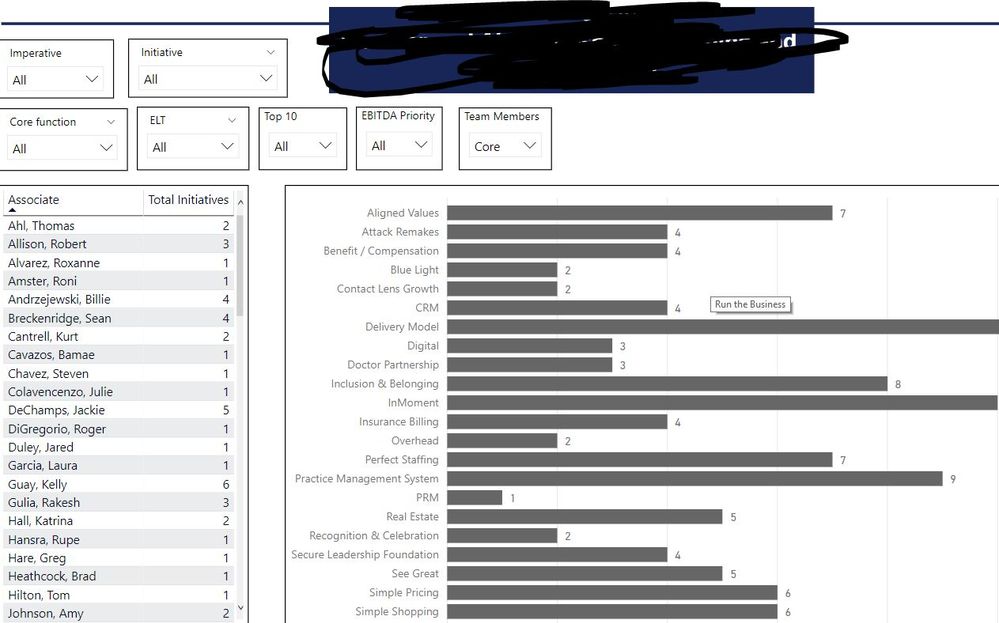
Currently, I have built a view to see the total resources in each project along with the resource. (below)
But I would like to get the projects, with its resources and also pull in what other projects they are in without changing the filters. Right now, I can get that information, but I have to change filters and manually track what other projects they are in.
You may take a look at https://appsource.microsoft.com/en-us/product/power-bi-visuals/WA104380764?src=office&tab=Overview.
Hello,
This visual doest not work with what I am trying to do.
The Power BI Data Visualization World Championships is back! It's time to submit your entry.
Check out the January 2026 Power BI update to learn about new features.
| User | Count |
|---|---|
| 56 | |
| 42 | |
| 41 | |
| 21 | |
| 21 |
| User | Count |
|---|---|
| 150 | |
| 107 | |
| 64 | |
| 36 | |
| 36 |