Join us at FabCon Atlanta from March 16 - 20, 2026, for the ultimate Fabric, Power BI, AI and SQL community-led event. Save $200 with code FABCOMM.
Register now!The Power BI Data Visualization World Championships is back! Get ahead of the game and start preparing now! Learn more
Hello,
I have data for 24 different projects. I have the resource name and project title. This is from an excel file.
Is ther a way to create a view where I can pull one project and see the resources assigned to that one project and also see where those resources are also allocated? In one view.
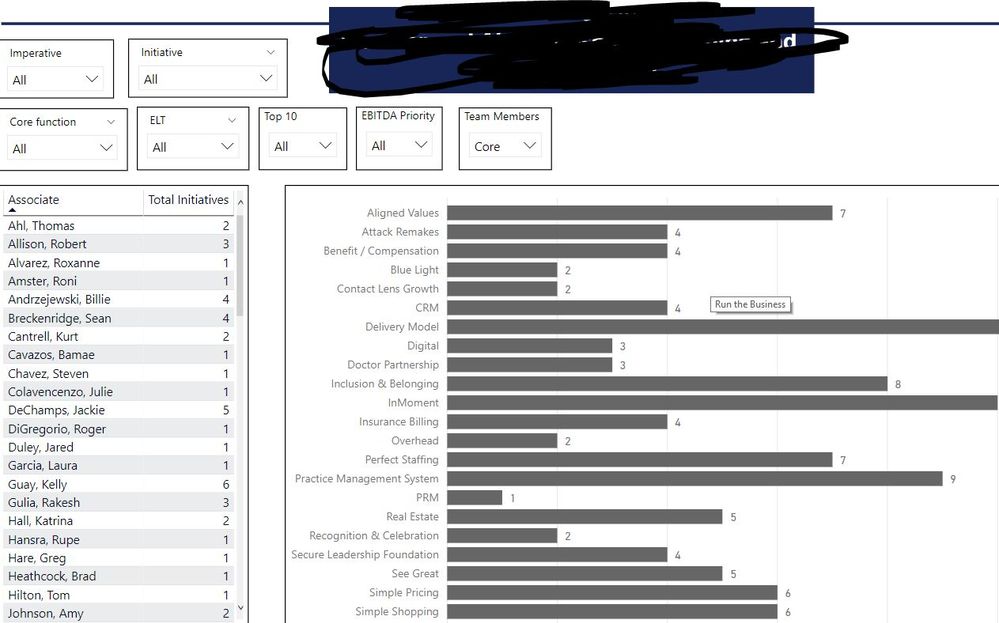
Currently, I have built a view to see the total resources in each project along with the resource. (below)
But I would like to get the projects, with its resources and also pull in what other projects they are in without changing the filters. Right now, I can get that information, but I have to change filters and manually track what other projects they are in.
You may take a look at https://appsource.microsoft.com/en-us/product/power-bi-visuals/WA104380764?src=office&tab=Overview.
Hello,
This visual doest not work with what I am trying to do.
The Power BI Data Visualization World Championships is back! Get ahead of the game and start preparing now!
| User | Count |
|---|---|
| 40 | |
| 35 | |
| 34 | |
| 31 | |
| 28 |
| User | Count |
|---|---|
| 137 | |
| 102 | |
| 71 | |
| 67 | |
| 65 |