cancel
Showing results for 
Search instead for 
Did you mean: 

Data Days is here! Join us now for 60+ days of learning, challenges, and connection. Learn more

Reply
nmck86
Post Patron
Post Patron

Project Completion Analysis

Hello! I am trying to build a calculation that will give me the avg days between each component of the project process.

For example: In the below excel file I have project ID 1 and I want to konw the avg days between each project status and there are several status levels up until it is in complete. I want to be able to see all those calculations on a bar chart showing the avg. That way if one status is taking longer than others by project we will have that visibility. Also, there are some situations where the status will get flipped back to a previous status and we want to analyze that as well. 


Example:

Wappr 5/15/2018

Iniatiated 5/17/2018

2 days in between

Inprogress 6/1/2018

Waitingcont 6/5/2018

4 days in between

Complete 6/10/2018

26 days in between


sample file for project process.png

1 ACCEPTED SOLUTION
Anonymous
Not applicable

Hi @nmck86,


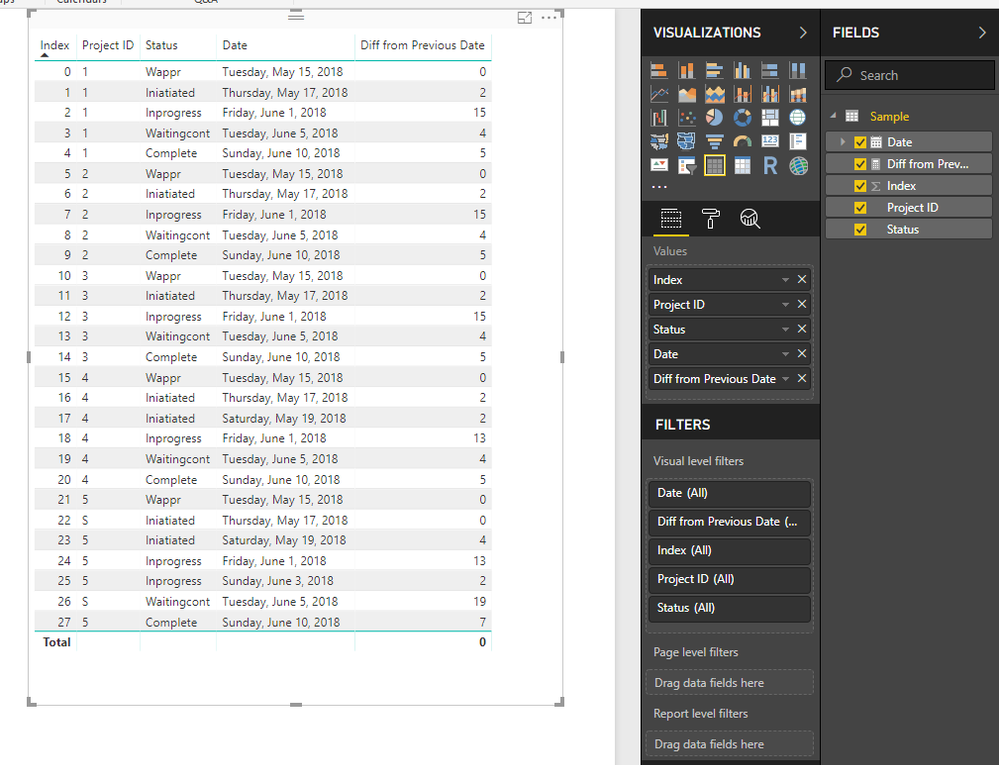
You can use below measure to calculate diff between previous date and current date who has same project id.

Diff from Previous Date =
VAR currProject =
    SELECTEDVALUE ( 'Sample'[Project ID] )
VAR currDate =
    SELECTEDVALUE ( 'Sample'[Date] )
VAR previous =
    MAXX (
        FILTER ( ALL ( 'Sample' ), [Project ID] = currProject && [Date] < currDate ),
        [Date]
    )
RETURN
    IF ( previous <> BLANK (), DATEDIFF ( previous, currDate, DAY ), 0 )

19.PNG


Regards,

Xiaoxin Sheng

View solution in original post

1 REPLY 1
Anonymous
Not applicable

Hi @nmck86,


You can use below measure to calculate diff between previous date and current date who has same project id.

Diff from Previous Date =
VAR currProject =
    SELECTEDVALUE ( 'Sample'[Project ID] )
VAR currDate =
    SELECTEDVALUE ( 'Sample'[Date] )
VAR previous =
    MAXX (
        FILTER ( ALL ( 'Sample' ), [Project ID] = currProject && [Date] < currDate ),
        [Date]
    )
RETURN
    IF ( previous <> BLANK (), DATEDIFF ( previous, currDate, DAY ), 0 )

19.PNG


Regards,

Xiaoxin Sheng

Helpful resources

Announcements
Fabric Data Days is here Carousel

Fabric Data Days 2026

Don't miss out on Data Days, June 15 through August 7. Learn Fabric, Power BI, SQL, AI and more.

May Power BI Update Carousel

Power BI Monthly Update - May 2026

Check out the May 2026 Power BI update to learn about new features.

Power BI DataViz World Championships carousel

Power BI DataViz World Championships - June 2026

A new Power BI DataViz World Championship is coming this June! Don't miss out on submitting your entry.