Join us at FabCon Atlanta from March 16 - 20, 2026, for the ultimate Fabric, Power BI, AI and SQL community-led event. Save $200 with code FABCOMM.
Register now!The Power BI Data Visualization World Championships is back! Get ahead of the game and start preparing now! Learn more
Hello. Can you help me please. I don't understand what I'm doing wrong.
I have this measure.
#PAG =
CALCULATE(SUMX(
VALUES(Resultados_final[MATERIAL]),
AVERAGE((Resultados_final[TAMANO_FOTO])
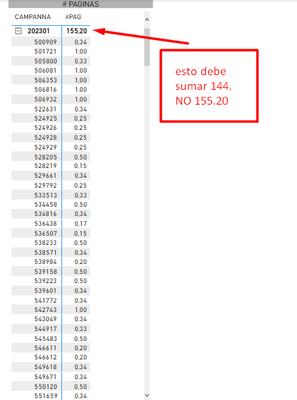
)),Resultados_final[EDICION]="2")With this measure I get this table.
The subtotal gives 155.20 and you shouldn't add that up. The actual result should be 144.
That adds up to all the values in the table.
I DON'T UNDERSTAND WHAT I DO WRONG. PLEASE HELP ME.
Thank you. The calculation is already correct. 144
@Syndicate_Admin , I think the same value is because of filter without using filter function
try like
#PAG =
CALCULATE(SUMX(
VALUES(Resultados_final[MATERIAL]),
calculate(AVERAGE((Resultados_final[TAMANO_FOTO]))
)),filter(Resultados_final, Resultados_final[EDICION]="2") )
you can move the filter inside the sumx calculate if needed
#PAG =
CALCULATE(SUMX(
VALUES(Resultados_final[MATERIAL]),
calculate(AVERAGE((Resultados_final[TAMANO_FOTO]),filter(Resultados_final, Resultados_final[EDICION]="2") ))
))
@Syndicate_Admin , Use measure or add calculate in expression
#PAG =
CALCULATE(SUMX(
VALUES(Resultados_final[MATERIAL]),
calculate(AVERAGE(Resultados_final[TAMANO_FOTO])
)),Resultados_final[EDICION]="2")
The Power BI Data Visualization World Championships is back! Get ahead of the game and start preparing now!
| User | Count |
|---|---|
| 65 | |
| 43 | |
| 41 | |
| 33 | |
| 23 |
| User | Count |
|---|---|
| 199 | |
| 124 | |
| 103 | |
| 74 | |
| 55 |