cancel
Showing results for 
Search instead for 
Did you mean: 

Vote for your favorite vizzies from the Power BI Dataviz World Championship submissions. Vote now!

Reply
Syndicate_Admin
Administrator
Administrator

Problem with sumx(values

Hello. Can you help me please. I don't understand what I'm doing wrong.

I have this measure.

#PAG = 
CALCULATE(SUMX(
VALUES(Resultados_final[MATERIAL]),
AVERAGE((Resultados_final[TAMANO_FOTO])
)),Resultados_final[EDICION]="2")

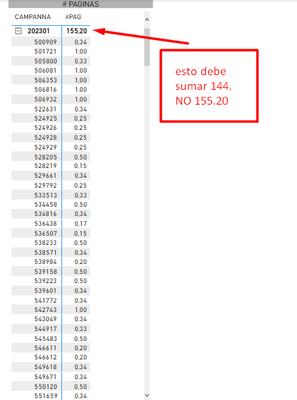
With this measure I get this table.

The subtotal gives 155.20 and you shouldn't add that up. The actual result should be 144.

That adds up to all the values in the table.

I DON'T UNDERSTAND WHAT I DO WRONG. PLEASE HELP ME.

CaroCM_27_0-1681440713478.png

3 REPLIES 3
Syndicate_Admin
Administrator
Administrator

Thank you. The calculation is already correct. 144

CaroCM_27_0-1681443081857.png

@Syndicate_Admin , I think the same value is because of filter without using filter function

try like


#PAG =
CALCULATE(SUMX(
VALUES(Resultados_final[MATERIAL]),
calculate(AVERAGE((Resultados_final[TAMANO_FOTO]))
)),filter(Resultados_final, Resultados_final[EDICION]="2") )


you can move the filter inside the sumx calculate if needed


#PAG =
CALCULATE(SUMX(
VALUES(Resultados_final[MATERIAL]),
calculate(AVERAGE((Resultados_final[TAMANO_FOTO]),filter(Resultados_final, Resultados_final[EDICION]="2") ))
))

Share with Power BI Enthusiasts: Full Power BI Video (20 Hours) YouTube
Microsoft Fabric Series 60+ Videos YouTube
Microsoft Fabric Hindi End to End YouTube
amitchandak
Super User
Super User

@Syndicate_Admin , Use measure or add calculate in expression


#PAG =
CALCULATE(SUMX(
VALUES(Resultados_final[MATERIAL]),
calculate(AVERAGE(Resultados_final[TAMANO_FOTO])
)),Resultados_final[EDICION]="2")

Share with Power BI Enthusiasts: Full Power BI Video (20 Hours) YouTube
Microsoft Fabric Series 60+ Videos YouTube
Microsoft Fabric Hindi End to End YouTube

Helpful resources

Announcements
Power BI DataViz World Championships

Power BI Dataviz World Championships

Vote for your favorite vizzies from the Power BI World Championship submissions!

Sticker Challenge 2026 Carousel

Join our Community Sticker Challenge 2026

If you love stickers, then you will definitely want to check out our Community Sticker Challenge!

January Power BI Update Carousel

Power BI Monthly Update - January 2026

Check out the January 2026 Power BI update to learn about new features.

FabCon Atlanta 2026 carousel

FabCon Atlanta 2026

Join us at FabCon Atlanta, March 16-20, for the ultimate Fabric, Power BI, AI and SQL community-led event. Save $200 with code FABCOMM.