
cancel
Showing results for 
Search instead for 
Did you mean: 

View all the Fabric Data Days sessions on demand. View schedule

Reply
azizdoghmi
Helper I
Helper I

Problem with lookup

Hi, 


I have 2 tables :

TABLE PROJECT

Project ID - Project Name-Project description

1-AA-kkkkkk

2-BB-oooooo

3-CC-iiiiiiiii


TABLE EVENT

Event ID - Event name-Project ID

1-xxx-1

2-yyy-1

3-zzz-3


I need to have a new table with all the projects and related events (even if no event)

Project ID-Event ID- Project Name

1-1-xxx

1-2-yyy

2-

3-3-zzz


I have tried to link the table (relation one to many) bu twe cannot see the projects without event.

And LOOK up formula in DAX gives the message "A table of multiple values was supplied where a single value was expected"


thank you very much for your support

1 ACCEPTED SOLUTION
Anonymous
Not applicable

Hi @azizdoghmi 

You can link two tables by Project ID column (one to many) and set Project ID column to show items with no data.

1.png

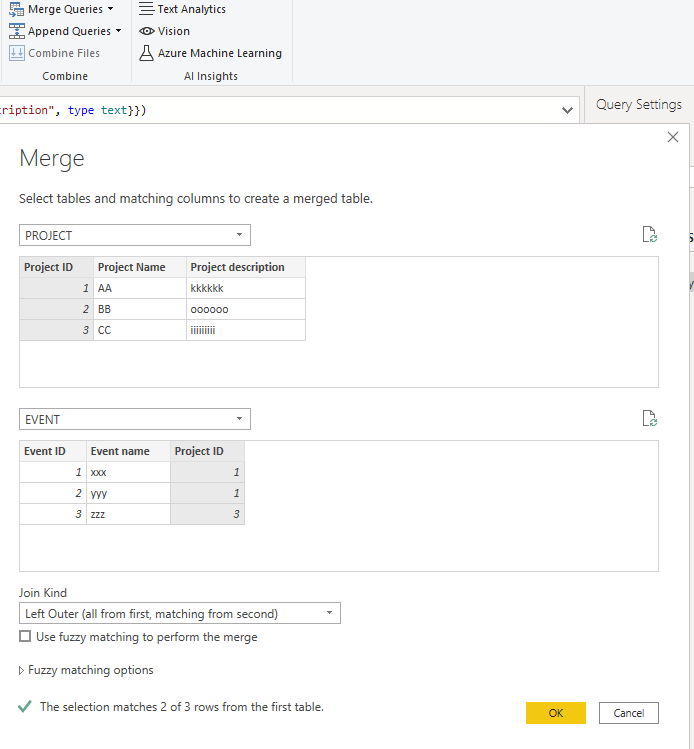
Or you can build a new table by merge function in Power Query Editor.

Merge Project and Event Table by Project ID columns and join kind = left outer .

2.png

Result is as below.

3.png

You can download the pbix file from this link: Problem with lookup


Best Regards,

Rico Zhou


If this post helps, then please consider Accept it as the solution to help the other members find it more quickly. 

View solution in original post

3 REPLIES 3
Anonymous
Not applicable

Hi @azizdoghmi 

You can link two tables by Project ID column (one to many) and set Project ID column to show items with no data.

1.png

Or you can build a new table by merge function in Power Query Editor.

Merge Project and Event Table by Project ID columns and join kind = left outer .

2.png

Result is as below.

3.png

You can download the pbix file from this link: Problem with lookup


Best Regards,

Rico Zhou


If this post helps, then please consider Accept it as the solution to help the other members find it more quickly. 

azizdoghmi
Helper I
Helper I

sorry I don't understand.

which formula in the measure?

how to join?


thks

amitchandak
Super User
Super User

@azizdoghmi , Simply Create a join on project id.

Create a measure, add +0 on that

Share with Power BI Enthusiasts: Full Power BI Video (20 Hours) YouTube
Microsoft Fabric Series 60+ Videos YouTube
Microsoft Fabric Hindi End to End YouTube

Helpful resources

Announcements
November Power BI Update Carousel

Power BI Monthly Update - November 2025

Check out the November 2025 Power BI update to learn about new features.

Fabric Data Days Carousel

Fabric Data Days

Advance your Data & AI career with 50 days of live learning, contests, hands-on challenges, study groups & certifications and more!

FabCon Atlanta 2026 carousel

FabCon Atlanta 2026

Join us at FabCon Atlanta, March 16-20, for the ultimate Fabric, Power BI, AI and SQL community-led event. Save $200 with code FABCOMM.

Top Solution Authors
Top Kudoed Authors