cancel
Showing results for 
Search instead for 
Did you mean: 

Get Fabric Certified for FREE during Fabric Data Days. Don't miss your chance! Request now

Reply
Anonymous
Not applicable

Problem with line chart

Hi All,


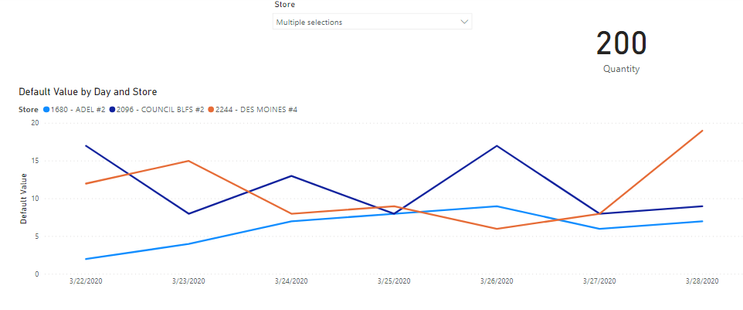
We have used a simple line chart in the report, wherein X-axis use Date, in Y-axis use Sales and in legends use Store as shown below. The problem here is that when I am select a few stores in slicers It shows total Quantity in the card, but when we try to select only one line from these three lines, it not reflect the total Quantity of that selected line, but it only reflects the quantity of that date selected.

Expected Result:

When we select only one line from these three lines in a card it shows Total Quantity of that selected line and not that selected date.

Thanks in Advance.

LineChart.png

 
1 ACCEPTED SOLUTION
v-lid-msft
Community Support
Community Support

Hi @Anonymous ,


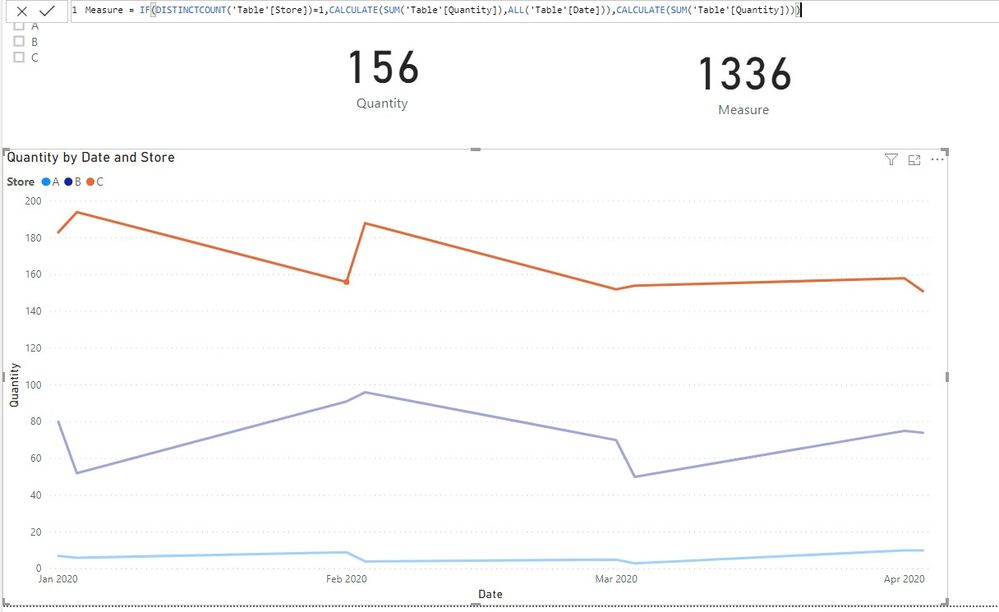
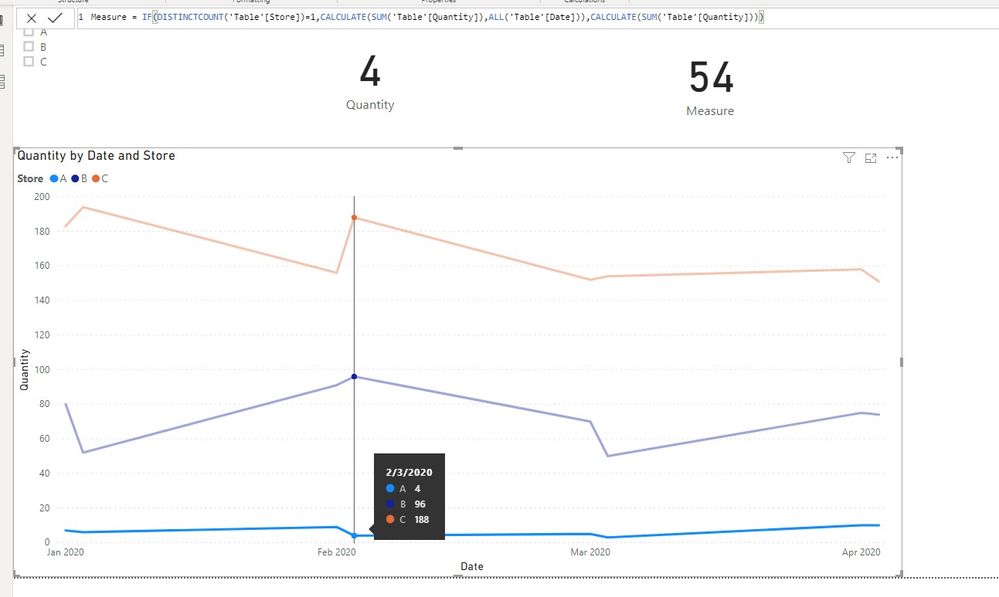
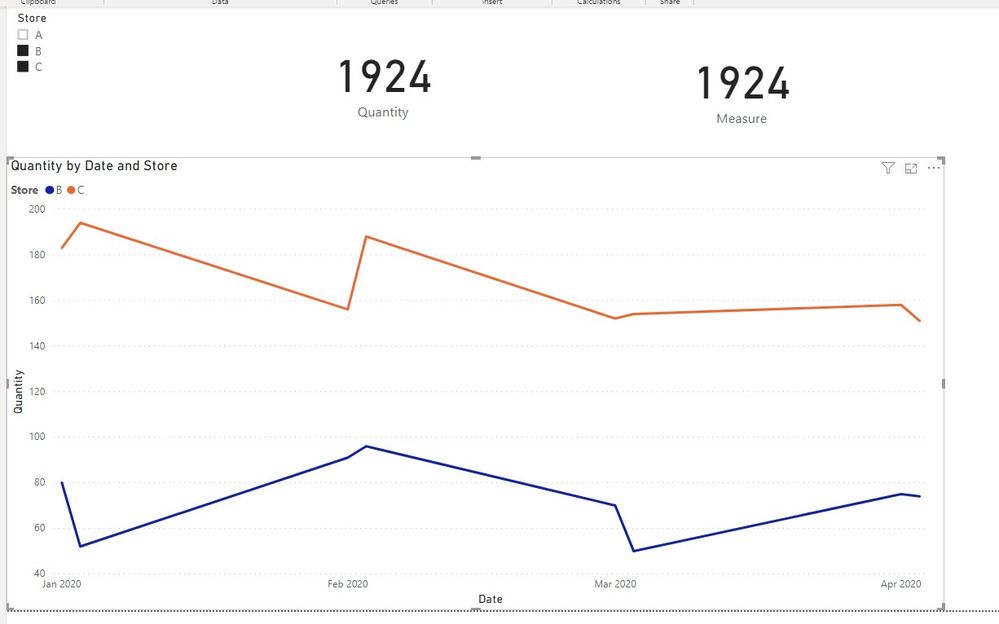
It because when select a line in line chart, it select sigle date as well, We can try to use following measure to meet your requirment:


Measure = IF(DISTINCTCOUNT('Table'[Store])=1,CALCULATE(SUM('Table'[Quantity]),ALL('Table'[Date])),CALCULATE(SUM('Table'[Quantity])))


3.jpg4.jpg5.jpg


If it doesn't meet your requirement, Could you please show the exact expected result based on the Tables that we have shared?


By the way, PBIX file as attached.


Best regards,


Community Support Team _ Dong Li
If this post helps, then please consider Accept it as the solution to help the other members find it more quickly.

View solution in original post

3 REPLIES 3
v-lid-msft
Community Support
Community Support

Hi @Anonymous ,


How about the result after you follow the suggestions mentioned in my original post?Could you please provide more details about it If it doesn't meet your requirement?


Best regards,

Community Support Team _ Dong Li
If this post helps, then please consider Accept it as the solution to help the other members find it more quickly.
v-lid-msft
Community Support
Community Support

Hi @Anonymous ,


It because when select a line in line chart, it select sigle date as well, We can try to use following measure to meet your requirment:


Measure = IF(DISTINCTCOUNT('Table'[Store])=1,CALCULATE(SUM('Table'[Quantity]),ALL('Table'[Date])),CALCULATE(SUM('Table'[Quantity])))


3.jpg4.jpg5.jpg


If it doesn't meet your requirement, Could you please show the exact expected result based on the Tables that we have shared?


By the way, PBIX file as attached.


Best regards,


Community Support Team _ Dong Li
If this post helps, then please consider Accept it as the solution to help the other members find it more quickly.
Anonymous
Not applicable

Sorry Please read In Y-Axis use Quantity

Helpful resources

Announcements
November Power BI Update Carousel

Power BI Monthly Update - November 2025

Check out the November 2025 Power BI update to learn about new features.

Fabric Data Days Carousel

Fabric Data Days

Advance your Data & AI career with 50 days of live learning, contests, hands-on challenges, study groups & certifications and more!

FabCon Atlanta 2026 carousel

FabCon Atlanta 2026

Join us at FabCon Atlanta, March 16-20, for the ultimate Fabric, Power BI, AI and SQL community-led event. Save $200 with code FABCOMM.

Top Solution Authors
Top Kudoed Authors