cancel
Showing results for 
Search instead for 
Did you mean: 

Get Fabric Certified for FREE during Fabric Data Days. Don't miss your chance! Request now

Reply
olimilo
Post Prodigy
Post Prodigy

Problem with getting the Top 5 entries

I've been trying to follow the examples on the forums, but I'm getting the incorrect output when trying to get the Top 5 Entries in my column.


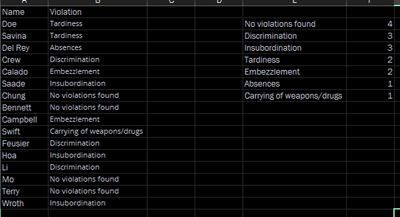
Given the following data:


something.png


I would like to get the top 5 results from the table. I tried the following formulas:


[Measure] Violation Ranking = RANKX(ALL(Violation_Data), COUNTA(Violation_Data[Violation]))

[Column] Top Violations = IF([Violation Ranking] > 5, "Others", Violation_Data[Violation])


But I'm still getting all of the results from [Violation] (I think it has something to do with the Calculated Column). I tried using a Visual Filter instead (show only [Violation Ranking] <= 5), but I'm still getting the same results (the [Violation Ranking] of each [Violation] is 1 (which is odd, to say the least) that's why all of the violations are displayed.


Anyone know how to correct the given DAX code?

1 ACCEPTED SOLUTION
olimilo
Post Prodigy
Post Prodigy

Okay, so I think I got it. I was able to use Visual Filters to select just the top 5 most recurrent Violations in the table like so:


BhdsW

View solution in original post

1 REPLY 1
olimilo
Post Prodigy
Post Prodigy

Okay, so I think I got it. I was able to use Visual Filters to select just the top 5 most recurrent Violations in the table like so:


BhdsW

Helpful resources

Announcements
November Power BI Update Carousel

Power BI Monthly Update - November 2025

Check out the November 2025 Power BI update to learn about new features.

Fabric Data Days Carousel

Fabric Data Days

Advance your Data & AI career with 50 days of live learning, contests, hands-on challenges, study groups & certifications and more!

FabCon Atlanta 2026 carousel

FabCon Atlanta 2026

Join us at FabCon Atlanta, March 16-20, for the ultimate Fabric, Power BI, AI and SQL community-led event. Save $200 with code FABCOMM.

Top Solution Authors
Top Kudoed Authors