cancel
Showing results for 
Search instead for 
Did you mean: 

July 7 - July 17 | Round 2 of the Power BI Dataviz World Championships. Don't miss your chance! Learn more

Reply
rmolinajr
Frequent Visitor

Problem with filter

Hi,


I'm with problem in a solution, the problem:


I put a filter of date and a graphic, the database exists the date 2012-01-01 to 2018-12-31, the idea is the following, when put the filter of date 2017-01-01 to 2018-12-31, in the graph will appear the years 2018, 2017, 2016 and 2015, but I can not show it in the graph, is there any way to do this?


thank you!

Roberto Molina Jr.

3 REPLIES 3
edhans
Community Champion
Community Champion

You would need the measure you are using to populate the graph to include an ALL() function to exclude the impact of the visual, or you could change the interactions for the graph to ignore the slicer. That is found in the Format|Edit Interactions menu of the Desktop app.


Did I answer your question? Mark my post as a solution!
Did my answers help arrive at a solution? Give it a kudos by clicking the Thumbs Up!

DAX is for Analysis. Power Query is for Data Modeling


Proud to be a Super User!

MCSA: BI Reporting

Hi,


I did this, but it does not work, because if I remove the filter interaction, I can not get the maximum of the date chosen by the filter, if I leave the filter interaction, the filtered years appear, below I'm leaving the dax code I'm using.


CALCULATE(
[VALOR TOTAL];
FILTER(
ALL(Tabela);
Tabela[Data] >= DATE(YEAR([MAX_DATA])-3;1;1) &&
Tabela[Data] <= DATE(YEAR([MAX_DATA]);12;31)
)
)


MAX_DATA = MAXX(ALLSELECTED(tblSipCcoLancamentos[Data]);tblSipCcoLancamentos[Data])


Thank you!

dedelman_clng
Community Champion
Community Champion

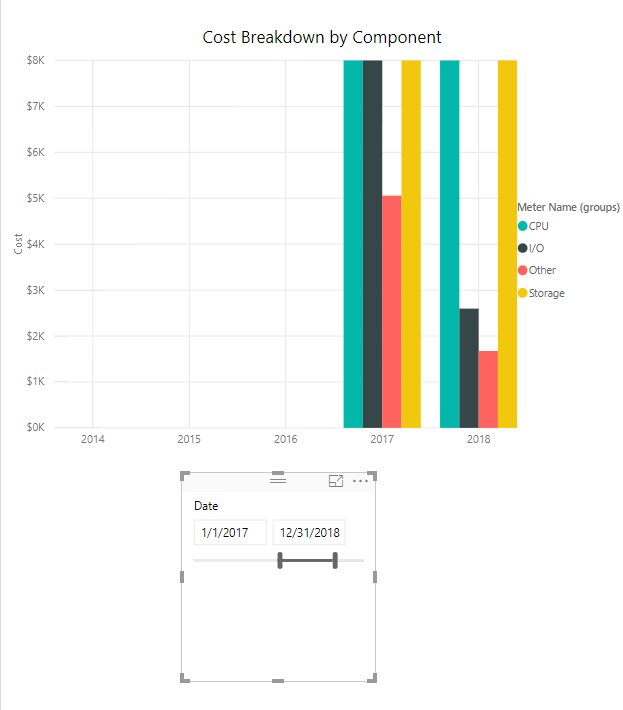
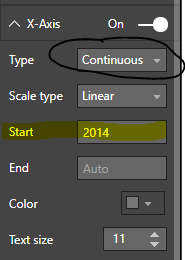
I think this is what you're looking for:


Make sure your X-axis is only year (this will not work with hierarchies), and that it is marked as Continuous (so it is being treated as a number). Then set "Start" to your minimum required date.Capture.PNG

Capture2.PNG


Hope this helps

David


Helpful resources

Announcements
FabCon and SQLCon Barcelona 2026

FabCon & SQLCon – Barcelona 2026

Join us in Barcelona for FabCon and SQLCon, the Fabric, Power BI, SQL, and AI community event. Save €200 with code FABCMTY200.

60 days of Data Days Carousel

Data Days 2026

Join Data Days 2026: 60 days of free live/on-demand sessions, challenges, study groups, and certification opportunities.

Power BI DataViz World Championships carousel

Power BI DataViz World Championships - June 2026

A new Power BI DataViz World Championship is coming this June! Don't miss out on submitting your entry.

Top Solution Authors