Get Fabric or SQL Certified for Free.
Get certified for free when you join Fabric Data Days 2026 and dive into Fabric, Power BI, SQL, AI, and other essential data skills.
Join now- Power BI forums
- Get Help with Power BI
- Desktop
- Service
- Report Server
- Power Query
- Mobile Apps
- Developer
- DAX Commands and Tips
- Custom Visuals Development Discussion
- Health and Life Sciences
- Power BI Spanish forums
- Translated Spanish Desktop
- Training and Consulting
- Instructor Led Training
- Dashboard in a Day for Women, by Women
- Galleries
- Data Stories Gallery
- Themes Gallery
- Contests Gallery
- QuickViz Gallery
- Quick Measures Gallery
- Visual Calculations Gallery
- Notebook Gallery
- Translytical Task Flow Gallery
- TMDL Gallery
- R Script Showcase
- Webinars and Video Gallery
- Ideas
- Custom Visuals Ideas (read-only)
- Issues
- Issues
- Events
- Upcoming Events
Try your skills in the Power BI Dataviz World Championship! Round one ends June 26. Join now
- Power BI forums
- Forums
- Get Help with Power BI
- Desktop
- Problem with a date filter
- Subscribe to RSS Feed
- Mark Topic as New
- Mark Topic as Read
- Float this Topic for Current User
- Bookmark
- Subscribe
- Printer Friendly Page


- Mark as New
- Bookmark
- Subscribe
- Mute
- Subscribe to RSS Feed
- Permalink
- Report Inappropriate Content
Problem with a date filter
Hello,
I produced this page in Power BI :
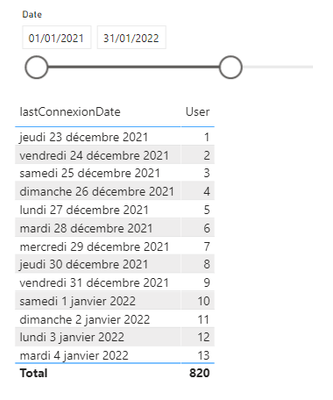
When I change the dates : my table refreshs correctly.
But if I change the formula of my measure "Statut" and I replace BLANK() by "inactive", the filter does not seem to work anymore.
Old measure : statut = if(ISBLANK([daysElapsed]),BLANK(),if([daysElapsed]<=10,"active","passive"))
New measure : statut = if(ISBLANK([daysElapsed]),"inactive",if([daysElapsed]<=10,"active","passive"))
Just replacing BLANK() by "inactive", I get this result :

The filter on my table shows that the date should be before 25/01/2022 but I get in my results some lines after 25/01/2022 ... (the ones for which status = "inactive").
Why do I get these lines ?
Thanks for your help ...
Solved! Go to Solution.

- Mark as New
- Bookmark
- Subscribe
- Mute
- Subscribe to RSS Feed
- Permalink
- Report Inappropriate Content
Hi @jsteffe ,
Slicer just filters the data of the columns in the connexions table, but the measure will not be changed by the selection of the slicer
You can use Flag to filter the date, only the date selected by the slicer is displayed in Visual
Here are the steps you can follow:
1. Create measure.
Flag =
var _min=MIN('Calendar'[Date])
var _max=MAX('Calendar'[Date])
return
IF(
    MAX('connexions'[lastConnexionDate])>=_min&&MAX('connexions'[lastConnexionDate])<=_max,1,0)
2. Place [Flag]in Filters, set is=1, apply filter.
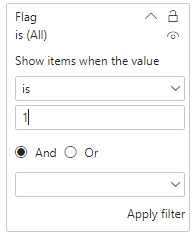
3. Result:
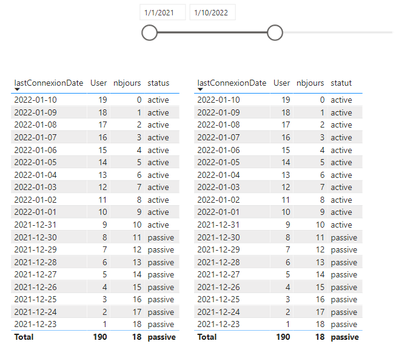
Best Regards,
Liu Yang
If this post helps, then please consider Accept it as the solution to help the other members find it more quickly
- Mark as New
- Bookmark
- Subscribe
- Mute
- Subscribe to RSS Feed
- Permalink
- Report Inappropriate Content
Hi @jsteffe ,
Slicer just filters the data of the columns in the connexions table, but the measure will not be changed by the selection of the slicer
You can use Flag to filter the date, only the date selected by the slicer is displayed in Visual
Here are the steps you can follow:
1. Create measure.
Flag =
var _min=MIN('Calendar'[Date])
var _max=MAX('Calendar'[Date])
return
IF(
    MAX('connexions'[lastConnexionDate])>=_min&&MAX('connexions'[lastConnexionDate])<=_max,1,0)
2. Place [Flag]in Filters, set is=1, apply filter.
3. Result:
Best Regards,
Liu Yang
If this post helps, then please consider Accept it as the solution to help the other members find it more quickly


- Mark as New
- Bookmark
- Subscribe
- Mute
- Subscribe to RSS Feed
- Permalink
- Report Inappropriate Content
- Mark as New
- Bookmark
- Subscribe
- Mute
- Subscribe to RSS Feed
- Permalink
- Report Inappropriate Content
I get 2 dates :
- one in my table connexions (the one which is in the table)
- one in my calendar date (which is in my slicer).
I put a relationship betxeen these 2 dates in my model.
You get the pbix file there :
https://filez.agro-bordeaux.fr/xs57gp
Thanks,
- Mark as New
- Bookmark
- Subscribe
- Mute
- Subscribe to RSS Feed
- Permalink
- Report Inappropriate Content
Ok, that's really made me think. Hoping @Greg_Deckler, @marcorusso or @AlbertoFerrari can confirm my conclusion.
I reduced it down as far I could to remove any issues I could think of and looked at the result query from the table in DAX studio. That included creating a very basic date table (NewDate) and replacing your status measure so it simply returns 1 regardless. Tidied up query in DAX Studio as follows:
DEFINE
  VAR DateFilterTable =
    FILTER(
      VALUES('NewDate'[Date]),
      'NewDate'[Date] < DATE(2022, 1, 26)
    )

  VAR ResultTable =
    SUMMARIZECOLUMNS(
      'connexions'[lastConnexionDate],
      DateFilterTable,
      "status", 1
    )


EVALUATE
  ResultTable

ORDER BY
  'connexions'[lastConnexionDate] DESC
Even in this simplified state you still get the same issue:
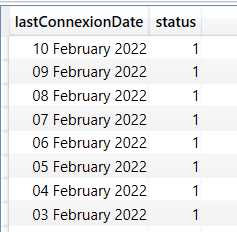
Going back to the definition of SUMMARIZECOLUMNS which is what PowerBi uses in the background for that visual there's the following statement:
"Filters in SUMMARIZECOLUMNS only apply to group-by columns from the same table and to measures. They do not apply to group-by columns from other tables directly, but indirectly through the implied non-empty filter from measures. In order to apply a filter to the group-by column unconditionally, apply the filter through a CALCULATETABLE function that evaluates SUMMARIZECOLUMNS."
In short because you're grouping by the date column in your fact table the filter from the date table has no effect. In fact it never did however it looked like it was because your original measure was returning blank. (Note the line "indirectly through the implied non-empty filter from measures").
In order to fix it you need to use the date column from your date table in the visual and then I suspect may have to tweak your original measure to turn it around.
- Mark as New
- Bookmark
- Subscribe
- Mute
- Subscribe to RSS Feed
- Permalink
- Report Inappropriate Content
Hello,
First, thanks a lot for your answer.
I don't understand clearly your sentence : "In fact it never did however it looked like it was because your original measure was returning blank." . The result seems to be good when my measure returns blank.
Second, I changed my table using the calendar date column rather than my connexiondate.
I had to change the measure "DaysElapsed" as follow :
daysElapsed=
So thanks a lot for your help. I just want to understand at last why I get the same results with my first measure which was :
statut = if(ISBLANK([daysElapsed]),BLANK(),if([daysElapsed]<=10,"active","passive"))


- Mark as New
- Bookmark
- Subscribe
- Mute
- Subscribe to RSS Feed
- Permalink
- Report Inappropriate Content
You are correct, nice diagnosis.
SUMMARIZECOLUMNS is likely to be the king of DAX shenanigans, the one you depicted is one of the nicest.
Helpful resources

Fabric Data Days 2026
Don't miss out on Data Days, June 15 through August 7. Learn Fabric, Power BI, SQL, AI and more.

Power BI DataViz World Championships - June 2026
A new Power BI DataViz World Championship is coming this June! Don't miss out on submitting your entry.

| User | Count |
|---|---|
| 23 | |
| 21 | |
| 20 | |
| 17 | |
| 11 |


| User | Count |
|---|---|
| 55 | |
| 53 | |
| 41 | |
| 36 | |
| 32 |


