Get certified for free when you join Fabric Data Days 2026 and dive into Fabric, Power BI, SQL, AI, and other essential data skills.
Join nowData Days is here! Join us now for 60+ days of learning, challenges, and connection. Learn more
Hello people this is my first post, i hope to get the answer for my question.
I have this SQL sentence:
with resultado as
(select top 12 *
from dbo.EVOL_SO_WXP
order by ID desc
union
select top 12 *
from dbo.EVOL_SO_W10
order by ID desc
union
select top 12 *
from dbo.EVOL_SO_W8
order by ID desc
union
select top 12 *
from dbo.EVOL_SO_W7
order by ID desc
union
select top 12 *
from dbo.EVOL_SO_W2000
order by ID desc
union
select top 12 *
from dbo.EVOL_SO_W2003
order by ID desc
union
select top 12 *
from dbo.EVOL_SO_W2008
order by ID desc
union
select top 12 *
from dbo.EVOL_SO_W2012
order by ID desc
)
select
ID,
[Sistema operativo],
Mes + ' ' + Año [Mes],
Total
from resultado order by ID
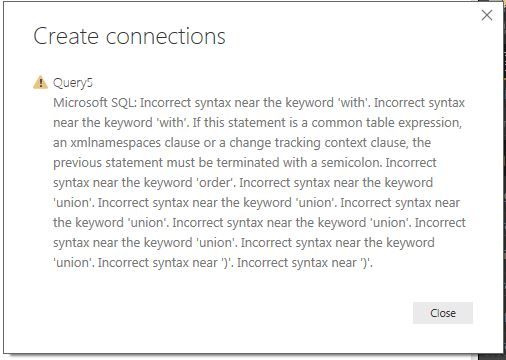
When I run this SQL sentence Power BI send me this error
But if I run the same Sentence in SQL Server it works, How can I fix this?
Thanks for the help!!!
Solved! Go to Solution.
Thanks for your help but I solve it, the solution was don't do that in DirectQuery mode, in Import mode I execute the Store Procedure and it works!!
Hey,
have a look here
https://community.powerbi.com/t5/Desktop/Custom-query-with-CTE-not-supported-bug/m-p/80522
,currently the usage of CTE is not supported Power BI
Two ways to circumvent this "limitation
My recommendation: 1.
Regards
Tom
Thanks for your help but I solve it, the solution was don't do that in DirectQuery mode, in Import mode I execute the Store Procedure and it works!!
Don't miss out on Data Days, June 15 through August 7. Learn Fabric, Power BI, SQL, AI and more.
Check out the May 2026 Power BI update to learn about new features.
| User | Count |
|---|---|
| 23 | |
| 21 | |
| 20 | |
| 19 | |
| 13 |
| User | Count |
|---|---|
| 58 | |
| 52 | |
| 37 | |
| 31 | |
| 27 |