cancel
Showing results for 
Search instead for 
Did you mean: 

Level up your Power BI skills this month - build one visual each week and tell better stories with data! Get started

Reply
Tiberwood
Regular Visitor

Problem with a Sentence

Hello people this is my first post, i hope to get the answer for my question.

I have this SQL sentence:


with resultado as
(select top 12 *
from dbo.EVOL_SO_WXP
order by ID desc
union
select top 12 *
from dbo.EVOL_SO_W10
order by ID desc
union
select top 12 *
from dbo.EVOL_SO_W8
order by ID desc
union
select top 12 *
from dbo.EVOL_SO_W7
order by ID desc
union
select top 12 *
from dbo.EVOL_SO_W2000
order by ID desc
union
select top 12 *
from dbo.EVOL_SO_W2003
order by ID desc
union
select top 12 *
from dbo.EVOL_SO_W2008
order by ID desc
union
select top 12 *
from dbo.EVOL_SO_W2012
order by ID desc
)
select
ID,
[Sistema operativo],
Mes + ' ' + Año [Mes],
Total
from resultado order by ID


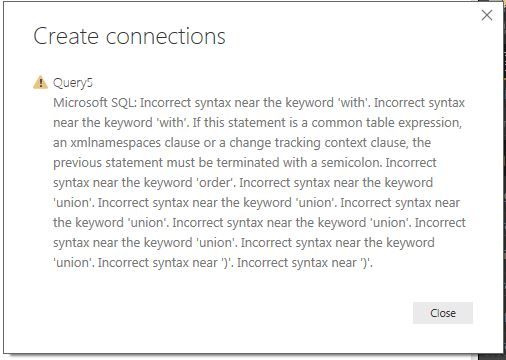
When I run this SQL sentence Power BI send me this errorPowerBi..JPG


But if I run the same Sentence in SQL Server it works, How can I fix this?

Thanks for the help!!!

1 ACCEPTED SOLUTION

Thanks for your help but I solve it, the solution was don't do that in DirectQuery mode, in Import mode I execute the Store Procedure and it works!!


View solution in original post

2 REPLIES 2
TomMartens
Super User
Super User

Hey,


have a look here

https://community.powerbi.com/t5/Desktop/Custom-query-with-CTE-not-supported-bug/m-p/80522

,currently the usage of CTE is not supported Power BI


Two ways to circumvent this "limitation

  1. create views in SQL Server and use these in Power BI
  2. use Power Query to rebuild the logic of your CTE

My recommendation: 1.


Regards

Tom


Did I answer your question? Mark my post as a solution, this will help others!

Proud to be a Super User!
I accept Kudos 😉
Hamburg, Germany

Thanks for your help but I solve it, the solution was don't do that in DirectQuery mode, in Import mode I execute the Store Procedure and it works!!


Helpful resources

Announcements
April Power BI Update Carousel

Power BI Monthly Update - April 2026

Check out the April 2026 Power BI update to learn about new features.

Fabric SQL PBI Data Days

Data Days 2026 coming soon!

Sign up to receive a private message when registration opens and key events begin.

New to Fabric survey Carousel

New to Fabric Survey

If you have recently started exploring Fabric, we'd love to hear how it's going. Your feedback can help with product improvements.

Power BI DataViz World Championships carousel

Power BI DataViz World Championships - June 2026

A new Power BI DataViz World Championship is coming this June! Don't miss out on submitting your entry.