cancel
Showing results for 
Search instead for 
Did you mean: 

Data Days is here! Join us now for 60+ days of learning, challenges, and connection. Learn more

Reply
That_Analyst
Microsoft Employee
Microsoft Employee

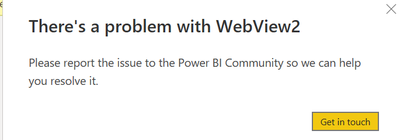
Problem with WevView2

That_Analyst_0-1660780905201.png

I'm unable to edit steps in the query editor. I need to modify some of the steps but when I click on the steps it gives the above message and sometimes I don't get any error but won't let me edit the step and nothing happens when I click on the settings next to the step.

That_Analyst_1-1660781016241.png


2 REPLIES 2
Anonymous
Not applicable

Hi @That_Analyst ,

Fo using the new version of the Power BI Desktop, you need to install the WebView2 on your computer.

Check this link for more info:

Power BI Desktop Installer Changes & WebView2 | Microsoft Power BI Blog | Microsoft Power BI


I have also found a similar document, please refer to it to see if it helps you.

Resolve issues when starting Power BI Desktop - Power BI | Microsoft Docs

The majority of the cases is caused by some program on your machine, mostly anti-virus software. To verify this is the case, please perform the following steps:

  1. Close Power BI Desktop.

  2. Open Windows Settings > About > Advanced System Settings and configure a new Environment Variable:

If I have misunderstood you meaning, please provide more details.


Best Regards

Community Support Team _ Polly


If this post helps, then please consider Accept it as the solution to help the other members find it more quickly.

amitchandak
Super User
Super User

@That_Analyst , Just press the refresh under the home tab of the power query


Seem like you have unchecked background preview of data under data load in options and settings 

Share with Power BI Enthusiasts: Full Power BI Video (20 Hours) YouTube
Microsoft Fabric Series 60+ Videos YouTube
Microsoft Fabric Hindi End to End YouTube

Helpful resources

Announcements
Fabric Data Days is here Carousel

Fabric Data Days 2026

Don't miss out on Data Days, June 15 through August 7. Learn Fabric, Power BI, SQL, AI and more.

May Power BI Update Carousel

Power BI Monthly Update - May 2026

Check out the May 2026 Power BI update to learn about new features.

Power BI DataViz World Championships carousel

Power BI DataViz World Championships - June 2026

A new Power BI DataViz World Championship is coming this June! Don't miss out on submitting your entry.