Join us at FabCon Atlanta from March 16 - 20, 2026, for the ultimate Fabric, Power BI, AI and SQL community-led event. Save $200 with code FABCOMM.
Register now!The Power BI Data Visualization World Championships is back! It's time to submit your entry. Live now!
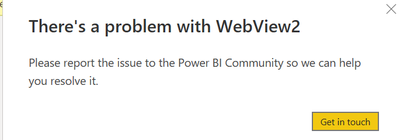
I'm unable to edit steps in the query editor. I need to modify some of the steps but when I click on the steps it gives the above message and sometimes I don't get any error but won't let me edit the step and nothing happens when I click on the settings next to the step.
Hi @That_Analyst ,
Fo using the new version of the Power BI Desktop, you need to install the WebView2 on your computer.
Check this link for more info:
Power BI Desktop Installer Changes & WebView2 | Microsoft Power BI Blog | Microsoft Power BI
I have also found a similar document, please refer to it to see if it helps you.
Resolve issues when starting Power BI Desktop - Power BI | Microsoft Docs
The majority of the cases is caused by some program on your machine, mostly anti-virus software. To verify this is the case, please perform the following steps:
Close Power BI Desktop.
Open Windows Settings > About > Advanced System Settings and configure a new Environment Variable:
If I have misunderstood you meaning, please provide more details.
Best Regards
Community Support Team _ Polly
If this post helps, then please consider Accept it as the solution to help the other members find it more quickly.
@That_Analyst , Just press the refresh under the home tab of the power query
Seem like you have unchecked background preview of data under data load in options and settings
| User | Count |
|---|---|
| 51 | |
| 40 | |
| 35 | |
| 23 | |
| 22 |
| User | Count |
|---|---|
| 134 | |
| 103 | |
| 57 | |
| 43 | |
| 38 |