Learn from the best! Meet the four finalists headed to the FINALS of the Power BI Dataviz World Championships! Register now
I was working with a client to calculate Value at Risk over a rolling window of time - this requires calculating the standard deviation over the period which I figured would work just great - here's what I wrote ...
// Standard Deviation Formula over a 10 Day Rolling Window (Out of the Box)
:=
CALCULATE (
STDEV.P ( Data[Price Change $] ),
FILTER (
ALL ( Data ),
Data[Date]
> ( MAX ( 'Date'[Date] ) - 11 )
&& Data[Date] < MAX ( 'Date'[Date] )
)
)
This formula returned the correct number for the first 10 days but then just returned zero. I went back to my CFA knowledge and wrote the standard deviation formula from scratch ...
// Standard Deviation Formula over a 10 Day Rolling Window (From Scratch)
:= VAR averageprice = [AVG Price Change Last 10 Days] VAR days = [COUNT Days] RETURN SQRT ( DIVIDE ( SUMX ( FILTER (ALL ( Data ), Data[Date] > ( MAX ( 'Date'[Date] ) - 11 ) && Data[Date] < MAX ( 'Date'[Date] ) ), ( Data[Prices Change $] - averageprice ) ^ 2 ), days ) )
This works great - curious if anyone has had problems with the standard deviation functions or if anyone sees an error in the intial STDEV formula that I constructed.
Thanks,
Austin
Solved! Go to Solution.
I think at this point you go to https://support.powerbi.com and use the Contact Support link to submit a bug.
Hi @austinsense and @Greg_Deckler
I have the same problem
Fact (Itemkey,DateKey,Demand) Demand is Measure from source.
DimDate (DateKey,MonthNumber)
DimItem(ItemKey,ItemNumber,CompanyKey)
Now i am trying to create standard deviation but the function 'Stdev.P' is not working.
all values are as 0's
So i tried another way by calculating individual steps:
Note: All the calculations are Measures.
CounOfMonth = COUNT(DimDate[MonthNumber])
Mean = CALCULATE([CounOfMonth],ALLSELECTED(DimItem[ItemNumber]),ALLSELECTED('Fact'))
AvgDemand = DIVIDE(CALCULATE(SUM('Fact'[Demand]),ALLSELECTED('Fact'),ALLSELECTED(DimItem[ItemNumber])),[Mean],0)
Demand-AvgDemand = SUM('Fact'[Demand]) - [AvgDemand]
Sqr(Demand-Avg) = [Demand-AvgDemand]^2
Sqr(Demand-Avg)/Mean = DIVIDE([Sqr(Demand-Avg)],[Mean],0)
till here values are coming fine but not totals. and i concern about totals why because i once i remove MonthNumber from the table only one record and one total will which will be the same values.
OR Combining all above formulas into a single Measure is also coming fine, as:
StdDev = DIVIDE((CALCULATE(SUM('Fact'[Demand]),ALLSELECTED(DimItem[ItemNumber])) - DIVIDE ( SUMX (ALLSELECTED('Fact'),'Fact'[Demand]),[Mean]))^2,[Mean])
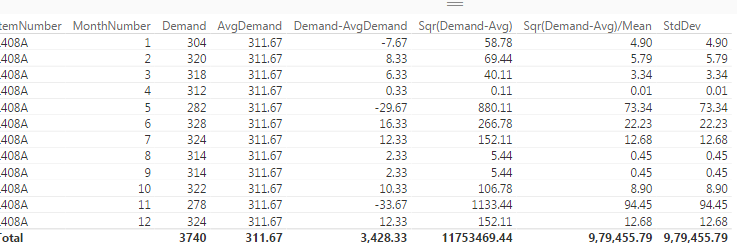
Once you add all values in Sqr(Demand-Avg)/Mean column
OR
Once you add all values in StdDev column
AND
Try try to do square root of it it is giving me the correct standard deviation as follows:
I filtered on a single item and working on it.
But when i try to complete standard deviation formula by applying SQRT to StdDev:
StdDev = SQRT(DIVIDE((CALCULATE(SUM('Fact'[Demand]),ALLSELECTED(DimItem[ItemNumber])) - DIVIDE ( SUMX (ALLSELECTED('Fact'),'Fact'[Demand]),[Mean]))^2,[Mean]))
OR
by creating another Measure:
SQRT = SQRT(CALCULATE([Sqr(Demand-Avg)/Mean],ALLSELECTED(DimItem[ItemNumber]),ALLSELECTED('Fact')))
The results looks like this
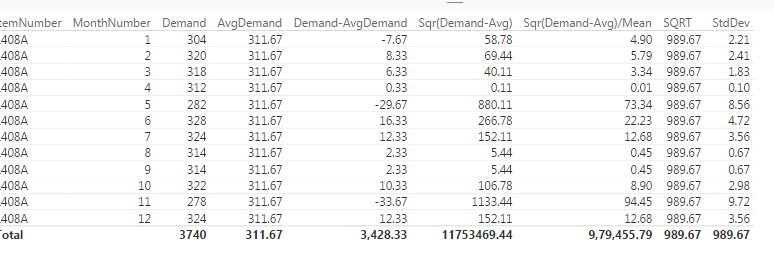
Why my totals are not coming fine?
What did i miss?
Thanks in advance.
Curious what happens if you use STDEVX.P with your FILTER instead of wrapping your STDEV.P inside a CALCULATE.
Same result, I tried it both ways
@austinsense What is the calc. behind the VAR (averageprice and days) below:
// Standard Deviation Formula over a 10 Day Rolling Window (From Scratch)
:= VAR averageprice = [AVG Price Change Last 10 Days] VAR days = [COUNT Days] RETURN SQRT ( DIVIDE ( SUMX ( FILTER (ALL ( Data ), Data[Date] > ( MAX ( 'Date'[Date] ) - 11 ) && Data[Date] < MAX ( 'Date'[Date] ) ), ( Data[Prices Change $] - averageprice ) ^ 2 ), days ) )
I am running into issue as well when using the STDDEVX.S formula .
I think at this point you go to https://support.powerbi.com and use the Contact Support link to submit a bug.
A new Power BI DataViz World Championship is coming this June! Don't miss out on submitting your entry.
Share feedback directly with Fabric product managers, participate in targeted research studies and influence the Fabric roadmap.
| User | Count |
|---|---|
| 56 | |
| 33 | |
| 33 | |
| 18 | |
| 16 |
| User | Count |
|---|---|
| 68 | |
| 67 | |
| 45 | |
| 30 | |
| 26 |