This time we’re going bigger than ever. Fabric, Power BI, SQL, AI and more. We're covering it all. You won't want to miss it.
Learn moreDid you hear? There's a new SQL AI Developer certification (DP-800). Start preparing now and be one of the first to get certified. Register now
Hi there,
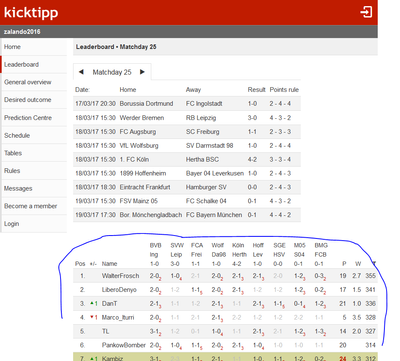
I am downloading data from https://www.kicktipp.de/zalando2016/tippuebersicht?wertung=einzelwertung&sortBy=gesamtpunkte&ranking...
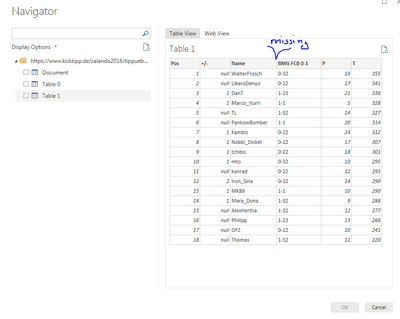
as you can see in the screenshot above, the table is a fairly standard HTML table. The table is also detected in Power BI. However for some reason there are not all of the columns in the table, when I import it. Anyone have an idea? or is the web connector broken?
Cheers,
Konrad
Solved! Go to Solution.
OK, took a look at this. That is a weirdly formatted table. I haven't really seen a thead element with multiple tr's in it. I'm guessing that is what is causing the issue. You can log it as an issue. However, I'm not up on my HTML standards 100% so I'm not even sure that is kosher HTML.
You could potentially choose the Document level and do the old expand drill down into the DOM by hand essentially. Might get you there.
Any chance you can post the source HTML of the table?
The link I posted is public https://www.kicktipp.de/zalando2016/tippuebersicht?wertung=einzelwertung&sortBy=gesamtpunkte&ranking...
Unfortunately the table html is larger than 20k characters, so I can't post it here. But i created a fiddle
OK, took a look at this. That is a weirdly formatted table. I haven't really seen a thead element with multiple tr's in it. I'm guessing that is what is causing the issue. You can log it as an issue. However, I'm not up on my HTML standards 100% so I'm not even sure that is kosher HTML.
You could potentially choose the Document level and do the old expand drill down into the DOM by hand essentially. Might get you there.
Check out the April 2026 Power BI update to learn about new features.
If you have recently started exploring Fabric, we'd love to hear how it's going. Your feedback can help with product improvements.
| User | Count |
|---|---|
| 37 | |
| 37 | |
| 31 | |
| 21 | |
| 16 |
| User | Count |
|---|---|
| 66 | |
| 56 | |
| 31 | |
| 26 | |
| 23 |