cancel
Showing results for 
Search instead for 
Did you mean: 

Data Days is here! Join us now for 60+ days of learning, challenges, and connection. Learn more

Reply
kschaefers
Resolver I
Resolver I

Problem with KickTipp Web Data Query

Hi there,


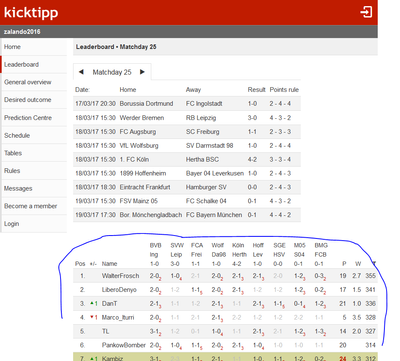
I am downloading data from https://www.kicktipp.de/zalando2016/tippuebersicht?wertung=einzelwertung&sortBy=gesamtpunkte&ranking...

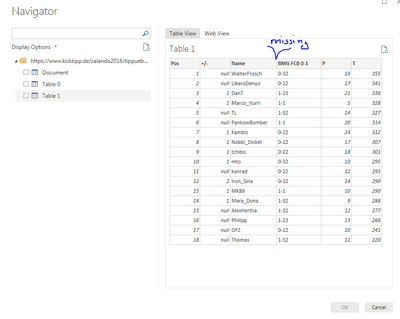
Capture.PNGas you can see in the screenshot above, the table is a fairly standard HTML table. The table is also detected in Power BI. However for some reason there are not all of the columns in the table, when I import it. Anyone have an idea? or is the web connector broken?


Capture2.PNG


Cheers,

Konrad

1 ACCEPTED SOLUTION

OK, took a look at this. That is a weirdly formatted table. I haven't really seen a thead element with multiple tr's in it. I'm guessing that is what is causing the issue. You can log it as an issue. However, I'm not up on my HTML standards 100% so I'm not even sure that is kosher HTML.


You could potentially choose the Document level and do the old expand drill down into the DOM by hand essentially. Might get you there.


Follow on LinkedIn
@ me in replies or I'll lose your thread!!!
Instead of a Kudo, please vote for this idea
Become an expert!: Enterprise DNA
External Tools: MSHGQM
YouTube Channel!: Microsoft Hates Greg
Latest book!:
DAX For Humans

DAX is easy, CALCULATE makes DAX hard...

View solution in original post

3 REPLIES 3
Greg_Deckler
Community Champion
Community Champion

Any chance you can post the source HTML of the table?


Follow on LinkedIn
@ me in replies or I'll lose your thread!!!
Instead of a Kudo, please vote for this idea
Become an expert!: Enterprise DNA
External Tools: MSHGQM
YouTube Channel!: Microsoft Hates Greg
Latest book!:
DAX For Humans

DAX is easy, CALCULATE makes DAX hard...

The link I posted is public https://www.kicktipp.de/zalando2016/tippuebersicht?wertung=einzelwertung&sortBy=gesamtpunkte&ranking...


Unfortunately the table html is larger than 20k characters, so I can't post it here. But i created a fiddle

https://jsfiddle.net/2sbg5hcq/

OK, took a look at this. That is a weirdly formatted table. I haven't really seen a thead element with multiple tr's in it. I'm guessing that is what is causing the issue. You can log it as an issue. However, I'm not up on my HTML standards 100% so I'm not even sure that is kosher HTML.


You could potentially choose the Document level and do the old expand drill down into the DOM by hand essentially. Might get you there.


Follow on LinkedIn
@ me in replies or I'll lose your thread!!!
Instead of a Kudo, please vote for this idea
Become an expert!: Enterprise DNA
External Tools: MSHGQM
YouTube Channel!: Microsoft Hates Greg
Latest book!:
DAX For Humans

DAX is easy, CALCULATE makes DAX hard...

Helpful resources

Announcements
Fabric Data Days is here Carousel

Fabric Data Days 2026

Don't miss out on Data Days, June 15 through August 7. Learn Fabric, Power BI, SQL, AI and more.

May Power BI Update Carousel

Power BI Monthly Update - May 2026

Check out the May 2026 Power BI update to learn about new features.

Power BI DataViz World Championships carousel

Power BI DataViz World Championships - June 2026

A new Power BI DataViz World Championship is coming this June! Don't miss out on submitting your entry.