Get certified for free when you join Fabric Data Days 2026 and dive into Fabric, Power BI, SQL, AI, and other essential data skills.
Join nowData Days is here! Join us now for 60+ days of learning, challenges, and connection. Learn more
Hi Community,
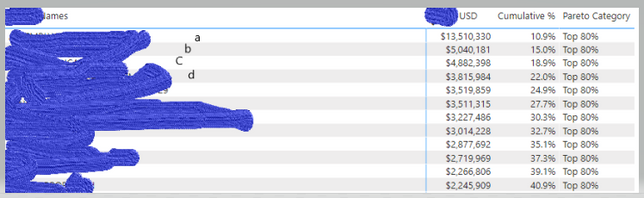
I am doing a Pareto analysis and I calculated the cumulative % using the following formula:
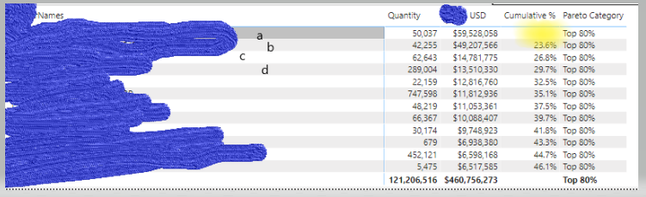
However, we I add in a new filed (quantity). The first value of the cumulative % becames blank. I am not sure why this happend. Can you please advice?
Thanks in Advance!
Solved! Go to Solution.
Hi @cailingjie0405 ,
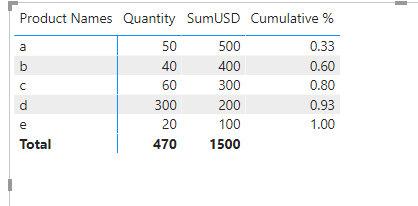
Don't know your model, maybe you can try the following measure:
Cumulative % =
CALCULATE(
SUMX('Product', [SumUSD]) ,
FILTER(
ALLSELECTED('Product'[Product Names]),
[SumUSD] >= SUM('Product'[USD])
)
) / SUMX( ALLSELECTED('Product'[Product Names]), [SumUSD] )
If the problem is still not resolved, please provide detailed error information or the expected result you expect. Let me know immediately, looking forward to your reply.
Best Regards,
Winniz
If this post helps, then please consider Accept it as the solution to help the other members find it more quickly.
Hi,
Share the link from where i can download your PBI file.
Hi @cailingjie0405 ,
Does your problem have been solved? If it is solved, please mark a reply which is helpful to you.
If the problem is still not resolved, please provide detailed error information or the expected result you expect. Let me know immediately, looking forward to your reply.
Best Regards,
Winniz
Hi,
Share the link from where i can download your PBI file.
Hi @cailingjie0405 ,
Don't know your model, maybe you can try the following measure:
Cumulative % =
CALCULATE(
SUMX('Product', [SumUSD]) ,
FILTER(
ALLSELECTED('Product'[Product Names]),
[SumUSD] >= SUM('Product'[USD])
)
) / SUMX( ALLSELECTED('Product'[Product Names]), [SumUSD] )
If the problem is still not resolved, please provide detailed error information or the expected result you expect. Let me know immediately, looking forward to your reply.
Best Regards,
Winniz
If this post helps, then please consider Accept it as the solution to help the other members find it more quickly.
Thank you. It works good
Don't miss out on Data Days, June 15 through August 7. Learn Fabric, Power BI, SQL, AI and more.
Check out the May 2026 Power BI update to learn about new features.
| User | Count |
|---|---|
| 23 | |
| 23 | |
| 20 | |
| 18 | |
| 14 |
| User | Count |
|---|---|
| 58 | |
| 51 | |
| 41 | |
| 30 | |
| 24 |